Free MP3 Converter For Android – Best Method
 Azaz Shaikh
Hello and welcome to another article. In this article, I am going to show you Free MP3 Converter For Android – Best Method. if you are looking for an mp3 converter for your android and you want to convert easily and fast. As you know most people have no idea how to convert video into mp3 and they don’t know what software and easy method to use. because there are lots of software in the Google Play Store and you are confused to use which one is best. therefore I am here to show you the best and easy way mp3 converter. Just you need to follow some easy steps which I am going to guide you.
Free MP3 Converter For Android – Best Method
MP3 Converter app.
The easy method which is software that you can easily convert. Millions of people are using this software because it is one of the best and easy software which I am going to tell you now. If you read this carefully you will get your all answers and there will not remain any more confusion.
How to download the mp3 converter?
Firstly, you have to download the app from the google play store. You need to open google play store then search there “MP3 Video Converter” after that install that app in your mobile. If you can’t find then don’t worry. Just click on the download button below.
Download MP3 Video Converter app
How to use the mp3 video converter app.
Step 1: First of all open the app then you need to allow the mp3 video converter that it should access photos, media, and files in your mobile.
 allow it
 Step 2: Now click on the ” Select ” button.
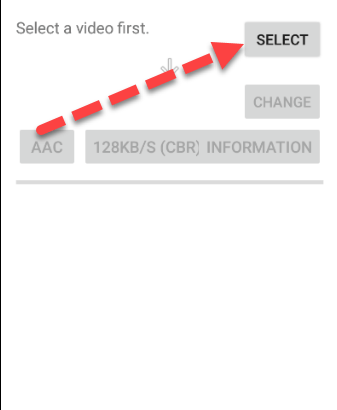 click on select
 Free MP3 Converter For Android – Best Method\
Step 3: Select the file which you want to convert in MP3.
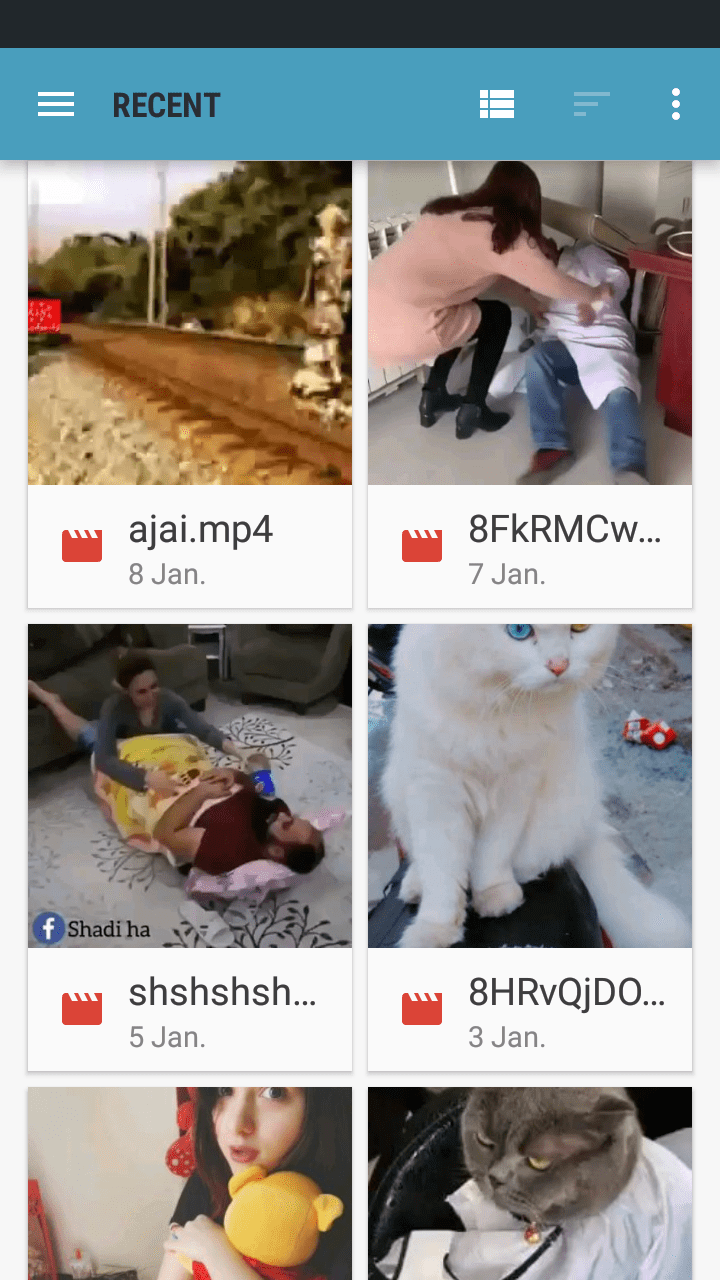 select the file
 Step 4: when you selected your file then after that click on Copy (AAC) then select mp3 format.
 click on the copy (AAC)
 Step 5: If you give information about the selected file then simply click on the information option then give whatever you want.
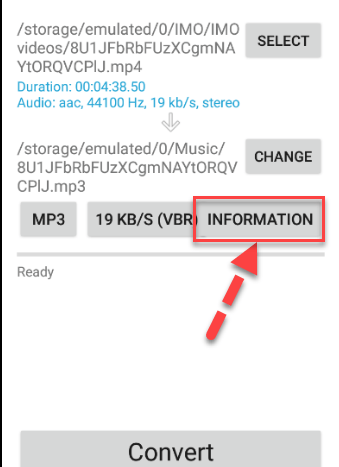 information
 Step 6: Now it is time to convert your video file into MP3. Simply click on the convert option.
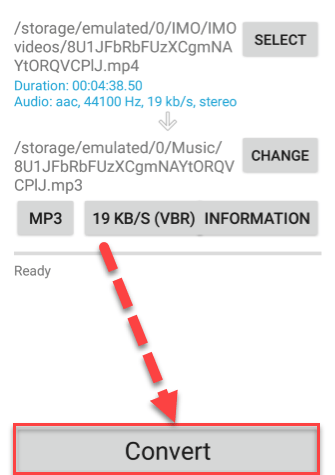 click convert
 So, Your file successfully converted in MP3 did you notice that it was a very simple and easy way. Hope you have learned something new from this interesting article.
Free MP3 Converter For Android – Best Method
Install Android Oreo On Virtual Box And VMWare Windows 10
Conclusion:
Therefore thanks for being with us till the end and it was aboutFree MP3 Converter For Android – Best Method. If again you face any problem then please leave a comment. Daily visit our website for best tech learning point.
Share This Article
Hello and welcome to another article. In this article, I am going to show you Free MP3 Converter For Android – Best Method. if you are looking for an mp3 converter for your android and you want to convert easily and fast. As you know most people have no idea how to convert video into mp3 and they don’t know what software and easy method to use. because there are lots of software in the Google Play Store and you are confused to use which one is best. therefore I am here to show you the best and easy way mp3 converter. Just you need to follow some easy steps which I am going to guide you.
Free MP3 Converter For Android – Best Method
MP3 Converter app.
The easy method which is software that you can easily convert. Millions of people are using this software because it is one of the best and easy software which I am going to tell you now. If you read this carefully you will get your all answers and there will not remain any more confusion.
How to download the mp3 converter?
Firstly, you have to download the app from the google play store. You need to open google play store then search there “MP3 Video Converter” after that install that app in your mobile. If you can’t find then don’t worry. Just click on the download button below.
Download MP3 Video Converter app
How to use the mp3 video converter app.
Step 1: First of all open the app then you need to allow the mp3 video converter that it should access photos, media, and files in your mobile.
allow it Step 2: Now click on the ” Select ” button.
click on select Free MP3 Converter For Android – Best Method\
Step 3: Select the file which you want to convert in MP3.
select the file Step 4: when you selected your file then after that click on Copy (AAC) then select mp3 format.
click on the copy (AAC) Step 5: If you give information about the selected file then simply click on the information option then give whatever you want.
information Step 6: Now it is time to convert your video file into MP3. Simply click on the convert option.
click convert So, Your file successfully converted in MP3 did you notice that it was a very simple and easy way. Hope you have learned something new from this interesting article.
Free MP3 Converter For Android – Best Method
Install Android Oreo On Virtual Box And VMWare Windows 10
Conclusion:
Therefore thanks for being with us till the end and it was aboutFree MP3 Converter For Android – Best Method. If again you face any problem then please leave a comment. Daily visit our website for best tech learning point.