

How to Download iPadOS 16 Developer Beta on iPad?
 Azaz Shaikh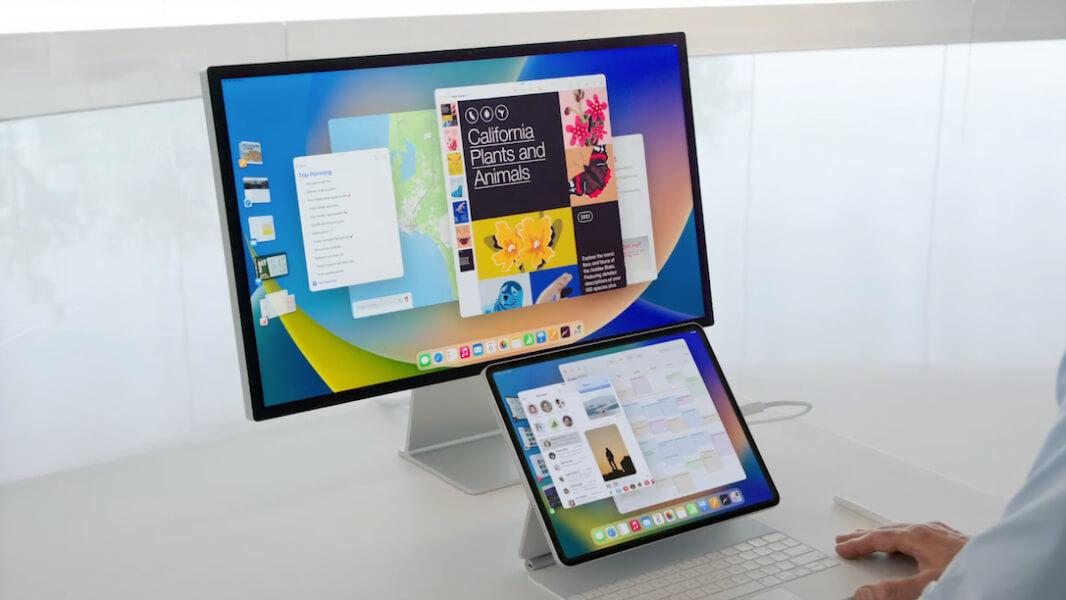
The beta version of the iPadOS 16 is now available. We will get more improvements in the iPadOS 16, which can support External Display. Everyone who is having iPad I hope that you are excited about it because of the new features. The new iPadOS 16 will also allow you to edit the messages and redesigned the lock screen of your iPad. Before the iPadOS 16 get launched I am sure that you want to try and have a look. If you want to download iPadOS 16 Developer Beta then you need to read this article. From this article, you will be guided on How to Download iPadOS 16 Developer Beta on iPad. So, without wasting any time let’s get started.
List of the iPads Compatible With iPadOS 16
- iPad Pro 12.9-inch (5th gen)
- iPad Pro 11-inch (3rd gen)
- iPad Pro 12.9-inch (4th gen)
- iPad Pro 11-inch (2nd gen)
- iPad Pro 12.9-inch (3rd gen)
- iPad Pro 11-inch (1st gen)
- iPad Pro 12.9-inch (2nd gen)
- iPad Pro 12.9-inch (1st gen)
- iPad Pro 10.5-inch
- iPad Pro 9.7-inch
- iPad (8th gen)
- iPad (7th gen)
- iPad (6th gen)
- iPad (5th gen)
- iPad mini (5th gen and later)
- iPad Air (4th gen)
- iPad Air (3rd gen)
Before We Start:
- If you download the iPadOS developer beta then you will face bugs and glitches. Of course, if you are having data on your device, backup them all to be safe.
- You also required an account to download the iPadOS 16 developer beta.
- Do you have a secondary iPad? So, if you have then it is better to try on that iPad.
How to Download iPadOS 16 Developer Beta
Step 1. First, you have to visit developer.apple.com on your iPad operating system.
Step 2. Go down by scrolling then click on the Download Resources.
Step 3. Again scroll down after that tap on the Install Profile from the section of iPadOS 16 beta. Click on the Allow when the message pop-up which will say This website is trying to download a configuration profile, do you want to allow this?
Step 4. Now, go to the iPad’s Settings after that head towards Profile Downloaded.
Step 5. Next, click on the Install then type the passcode of your iPad.
Step 6. At last, you will the get restart option automatically to restart your device, if you don’t see the restart button after that simply restart your iPad.
How to Install iPadOS 16 Developer Beta
Step 1. Launch the Settings of your iPad then go to the General.
Step 2. Click on the Software Update.
Step 3. Tap on the Download and Install.
Step 4. Wait till the update file should be installed then click Install.
Step 5. Finally, you have to enter the passcode of your iPad and enter your Apple ID Password.
Final Words
It was all about How to Download iPadOS 16 Developer Beta on iPad. I hope this article is very helpful for you to download the iPadOS 16 Developer Beta. From this article, you will get something good. This was step by step guide on the downloading process of the iPadOS 16 developer beta. Further, this is the right place where you can easily solve your problem. After following these steps I hope you will not face any kind of problem. If you faced any kind of problem and if you have any type of suggestion then do comment.
Explore More:
Tagged
Share This Article
The beta version of the iPadOS 16 is now available. We will get more improvements in the iPadOS 16, which can support External Display. Everyone who is having iPad I hope that you are excited about it because of the new features. The new iPadOS 16 will also allow you to edit the messages and redesigned the lock screen of your iPad. Before the iPadOS 16 get launched I am sure that you want to try and have a look. If you want to download iPadOS 16 Developer Beta then you need to read this article. From this article, you will be guided on How to Download iPadOS 16 Developer Beta on iPad. So, without wasting any time let’s get started.
List of the iPads Compatible With iPadOS 16
- iPad Pro 12.9-inch (5th gen)
- iPad Pro 11-inch (3rd gen)
- iPad Pro 12.9-inch (4th gen)
- iPad Pro 11-inch (2nd gen)
- iPad Pro 12.9-inch (3rd gen)
- iPad Pro 11-inch (1st gen)
- iPad Pro 12.9-inch (2nd gen)
- iPad Pro 12.9-inch (1st gen)
- iPad Pro 10.5-inch
- iPad Pro 9.7-inch
- iPad (8th gen)
- iPad (7th gen)
- iPad (6th gen)
- iPad (5th gen)
- iPad mini (5th gen and later)
- iPad Air (4th gen)
- iPad Air (3rd gen)
Before We Start:
- If you download the iPadOS developer beta then you will face bugs and glitches. Of course, if you are having data on your device, backup them all to be safe.
- You also required an account to download the iPadOS 16 developer beta.
- Do you have a secondary iPad? So, if you have then it is better to try on that iPad.
How to Download iPadOS 16 Developer Beta
Step 1. First, you have to visit developer.apple.com on your iPad operating system.
Step 2. Go down by scrolling then click on the Download Resources.
Step 3. Again scroll down after that tap on the Install Profile from the section of iPadOS 16 beta. Click on the Allow when the message pop-up which will say This website is trying to download a configuration profile, do you want to allow this?
Step 4. Now, go to the iPad’s Settings after that head towards Profile Downloaded.
Step 5. Next, click on the Install then type the passcode of your iPad.
Step 6. At last, you will the get restart option automatically to restart your device, if you don’t see the restart button after that simply restart your iPad.
How to Install iPadOS 16 Developer Beta
Step 1. Launch the Settings of your iPad then go to the General.
Step 2. Click on the Software Update.
Step 3. Tap on the Download and Install.
Step 4. Wait till the update file should be installed then click Install.
Step 5. Finally, you have to enter the passcode of your iPad and enter your Apple ID Password.
Final Words
It was all about How to Download iPadOS 16 Developer Beta on iPad. I hope this article is very helpful for you to download the iPadOS 16 Developer Beta. From this article, you will get something good. This was step by step guide on the downloading process of the iPadOS 16 developer beta. Further, this is the right place where you can easily solve your problem. After following these steps I hope you will not face any kind of problem. If you faced any kind of problem and if you have any type of suggestion then do comment.
Explore More:


