

How To Post On Instagram From PC 2020 [New Method]
 Azaz Shaikh
![How To Post On Instagram From PC 2020 [New Method]](/_next/image?url=https%3A%2F%2Fwriteflow-media.s3.amazonaws.com%2Fsites%2F16%2Fmedia%2F2025%2F10%2Fhow-to-post-on-instagram-from-pc-2020-KiJk2h.jpg&w=3840&q=75)
Instagram is one of the stable and popular social media platforms all around the world. Nowadays everybody is using Instagram for posting photos and videos publicly. You can also have different kinds of videos on Instagram which brings joy to our daily life. You might confidently post photos or videos on Instagram using your Mobile phone but posting form a PC is a kind of tricky. Most of the people get confused while posting from PC because they won’t find such an option which we have in their app. Therefore. I will completely guide you on How To Post On Instagram From PC 2020 .
Instagram recently made it possible for the user in order to directly send and receive a message from the PC. But it is progressing slowly due to which we don’t have the option to post from PC. Instagram is a mobile app, from your smartphone you can control each and everything of your Instagram account. If you are a daily user of Instagram then you should better know about posting from PC because in PC we have better photo and video editing software.
The process of posting on Instagram from PC needs a little effort in order to set up it. You can use its application on your PC and also can post using your favorite browser. Once you learned posting from PC then you can make your life easier. Furthermore, I will go for each step on How To Post On Instagram From PC 2020 .
- Recommend Guide: How to Save Instagram Videos on Windows, Android, and iOS
How To Post On Instagram From PC
The only way to post Instagram from the PC using the web browser. Therefore, you have to follow the below procedure to not make any mistake.
Open your Favorite browser, for the purpose of this article we will be using Google Chrome. Once it is opened, at the search bar type Instagram.com.
Once the website appears, make sure to log in to your Instagram account.
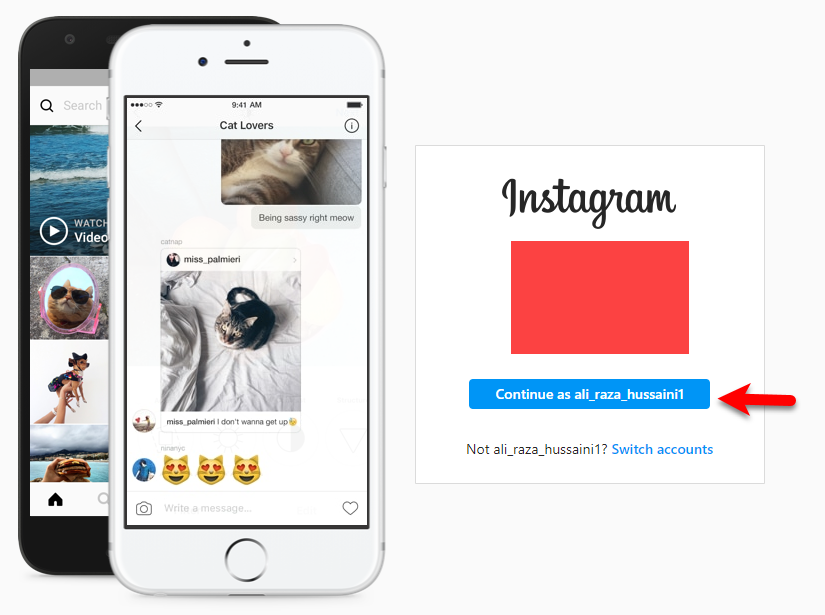 Log in to your Instagram account
 After that, click on the three dots on the right upper of Chrome. Select More Tools and then click on the Developer Tools. Or directly press Ctrl + Shift + I from the keyboard.
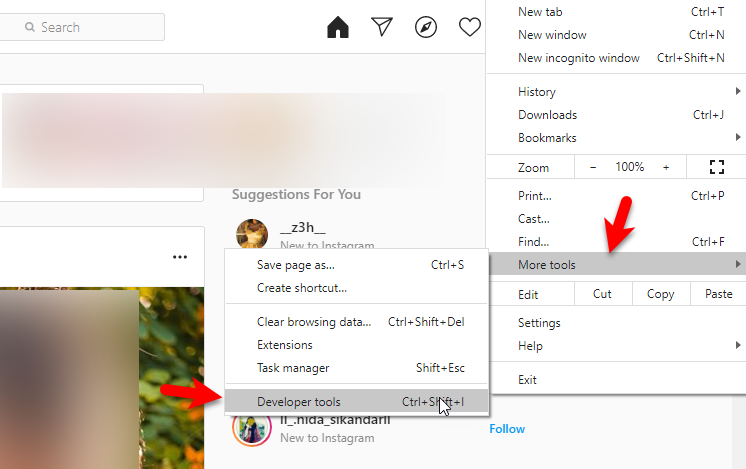 Developer Tools
 On the Developer Tools window, click on the left upper corner and select your device to have that interface.
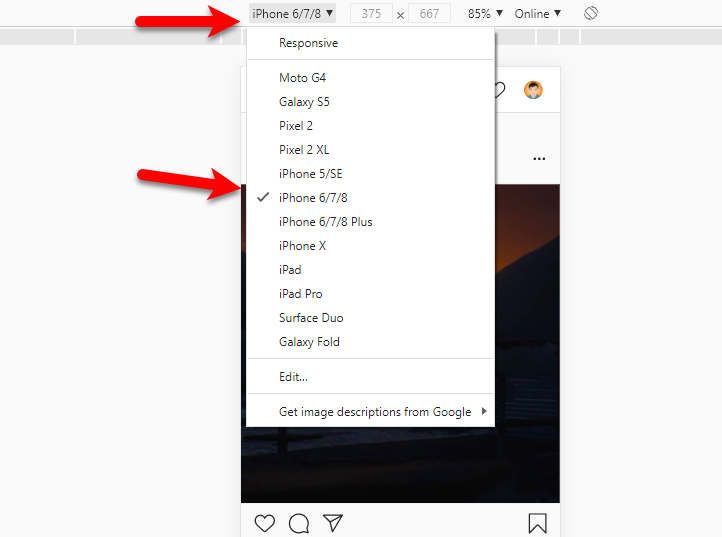 Select any device
 Once the device is selected, to apply the effect, you have to refresh the window by clicking on the refresh icon from the left upper corner.
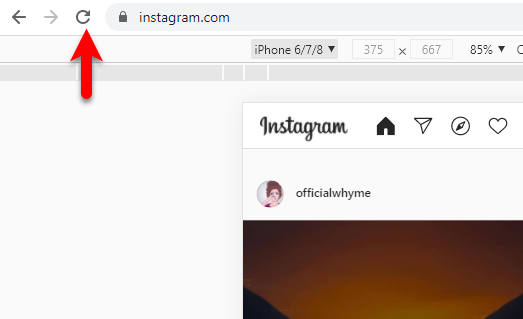 Refresh the window
 Then, you will have the complete interface of the Instagram app. To post any video or photo, you have to click on the + icon from the bottom.
 Plus Icon
 Another window will pop up from where you can choose a photo or video in order to post.
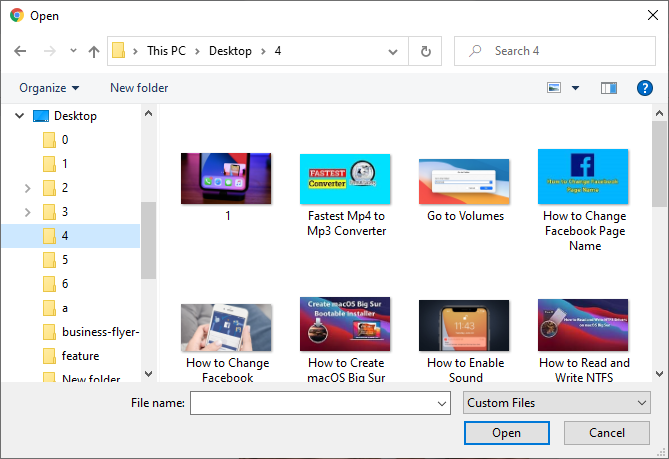 Choose photo or video
 The photo will be selected automatically, click on the resize to adjust the photo with the screen and click on the Next.
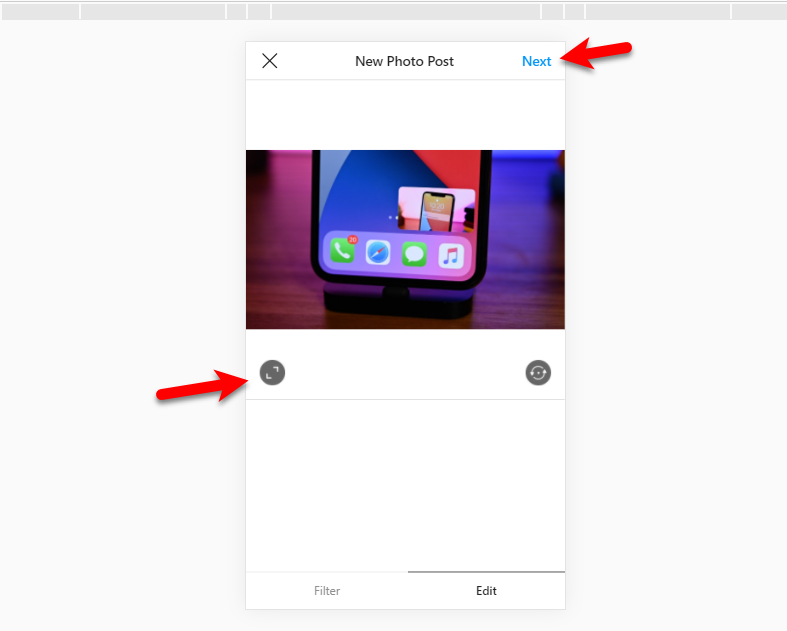 Resize the Photo
 Now, write a caption for your photo or video which you have selected, and finally click on the Share.
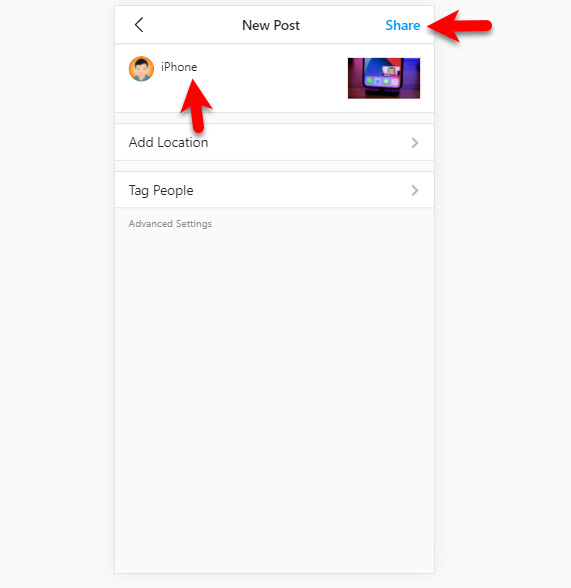 Post on Instagram
 I hope you have posted on Instagram from PC. It was the only way to post from PC.
Related Searches:
- How to Post On Instagram From PC
- How to Post On Instagram From a Computer
- Can you post on Instagram from a PC
- How do I post on Instagram from PC
Bottom Line
The complete procedure on How To Post On Instagram From PC 2020 . You can use the same procedure on all operating systems and as well as on all web browsers. It is unique which every user uses for posting something from PC. If you have any questions about this guide then don’t hesitate to leave comments in the comment section down below.
Share This Article
Instagram is one of the stable and popular social media platforms all around the world. Nowadays everybody is using Instagram for posting photos and videos publicly. You can also have different kinds of videos on Instagram which brings joy to our daily life. You might confidently post photos or videos on Instagram using your Mobile phone but posting form a PC is a kind of tricky. Most of the people get confused while posting from PC because they won’t find such an option which we have in their app. Therefore. I will completely guide you on How To Post On Instagram From PC 2020 .
Instagram recently made it possible for the user in order to directly send and receive a message from the PC. But it is progressing slowly due to which we don’t have the option to post from PC. Instagram is a mobile app, from your smartphone you can control each and everything of your Instagram account. If you are a daily user of Instagram then you should better know about posting from PC because in PC we have better photo and video editing software.
The process of posting on Instagram from PC needs a little effort in order to set up it. You can use its application on your PC and also can post using your favorite browser. Once you learned posting from PC then you can make your life easier. Furthermore, I will go for each step on How To Post On Instagram From PC 2020 .
- Recommend Guide: How to Save Instagram Videos on Windows, Android, and iOS
How To Post On Instagram From PC
The only way to post Instagram from the PC using the web browser. Therefore, you have to follow the below procedure to not make any mistake.
Open your Favorite browser, for the purpose of this article we will be using Google Chrome. Once it is opened, at the search bar type Instagram.com.
Once the website appears, make sure to log in to your Instagram account.
Log in to your Instagram account After that, click on the three dots on the right upper of Chrome. Select More Tools and then click on the Developer Tools. Or directly press Ctrl + Shift + I from the keyboard.
Developer Tools On the Developer Tools window, click on the left upper corner and select your device to have that interface.
Select any device Once the device is selected, to apply the effect, you have to refresh the window by clicking on the refresh icon from the left upper corner.
Refresh the window Then, you will have the complete interface of the Instagram app. To post any video or photo, you have to click on the + icon from the bottom.
Plus Icon Another window will pop up from where you can choose a photo or video in order to post.
Choose photo or video The photo will be selected automatically, click on the resize to adjust the photo with the screen and click on the Next.
Resize the Photo Now, write a caption for your photo or video which you have selected, and finally click on the Share.
Post on Instagram I hope you have posted on Instagram from PC. It was the only way to post from PC.
Related Searches:
- How to Post On Instagram From PC
- How to Post On Instagram From a Computer
- Can you post on Instagram from a PC
- How do I post on Instagram from PC
Bottom Line
The complete procedure on How To Post On Instagram From PC 2020 . You can use the same procedure on all operating systems and as well as on all web browsers. It is unique which every user uses for posting something from PC. If you have any questions about this guide then don’t hesitate to leave comments in the comment section down below.


