

How to Recover the Corrupted and Lost Data With Ease
 Azaz Shaikh
In this article, you will learn about How to Recover the Corrupted and Lost Data With Ease. Nowadays as we all know that technology is improving and providing us the best software. There is one amazing software which you can recover all the deleted files and it can also recover if the file is corrupted. Therefore, sometimes it might happen that the file is lost or accidentally deleted and you don’t have any idea about recovering the file. So, the file might be important to you but no worries we will guide you about it. The recovery software that I am going to guide you is one of the best software for and useful for everyone.
This software will help you to recover your all deleted files such as documents, videos, and photo, etc. You can recover all the files from Memory card, USB and external hard disk. Therefore, in this article, I will guide you each and everything below. And this software is free of cost and you can also download from below. I will guide from the installation of software up to recovering your personal file. Therefore, it doesn’t need any special pc to use it you need to have a normal pc.
Stellar Data Recovery:
The software which I am using to recover all files which are deleted. Therefore, I will also guide how to do it. The name of the software is Stellar Data Recovery. So, this software is mostly the windows user is using for data recovery You can also use it on the Mac and Linux operating system. So, download it from below and install it on your pc. The installation process is very easy but again I want to clear it for you in order not to have any kind of problem. And after the installation process, I will also guide you on how to recover deleted files from it which is very easy and understandable for everyone.
Stellar Data Recovery will also give you the option of Save Scan which is very useful for the user. When you scan your files and if you move your laptop here and there but again it can save that file without restarting your laptop. I will share with you guys more about the features of Stellar Data Recovery which must know before using it.
Features of Stellar Data Recovery:
CD DVD Recovery:
This feature allows quick recovery of important files, memorable photos, audios, videos, and other documents stored on your incorrectly burnt or severely damaged optical disc. You can use this feature to safely recover data from CDs, DVDs, Blu-ray discs, and HD DVDs.
Photo Recovery:
‘Photo Recovery’ allows recovery of pictures, movies, songs, and other multimedia files from Windows based drives and volumes. It supports a comprehensive list of a digital image, audio, and videos file formats. Further, it enables the selective recovery of images.
Email Recovery:
This feature will let you recover email file types such as EMLX,PST,MSG,EDB,MBOX, etc. from the MS-Outlook and Outlook Express.
Imaging:
‘Imaging’ enables you to create an image of your hard drive or a snapshot of any selected region on the drive. Any other software on the market cannot restore an image created using this software.
Resume Recovery:
The feature allows you to restart recovery at a convenient time using the image of a storage device or any previously saved scan information. In this way, you can perform recovery in two phases using the software.
RAW Recovery:
This feature will permit us to add or edit header for the RAW Recovery process.
Download Stellar Data Recovery:
For downloading this software you don’t need to waste your money because it is free of cost and it is also 100% secure to use it. However, you can download it from its own website Stellar Data Recovery Download. To download click on the Free and wait for the downloading. Therefore, the installation process follows each step below.
Install Stellar Data Recovery on your PC:
When the downloading is finished, you need to go to that which you have selected for downloads on your pc. Double-click on the setup of Stellar Data Recovery. And follow the step below
Step 1. First of all, when you double-click, then you need to select the language which you are good in. I simply select the English language.
Step 2. The welcome page will be opened, you have to click on the next to go one step forward.
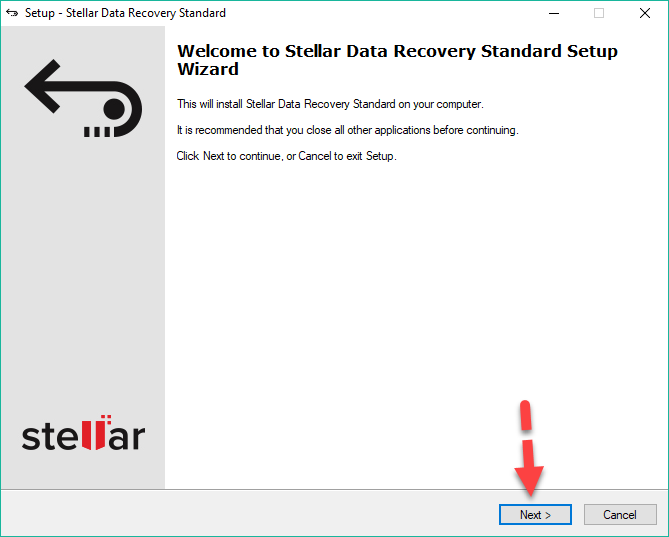 Click Next
 Step 3. In License Agreement page you have to agree with that then click on Next.
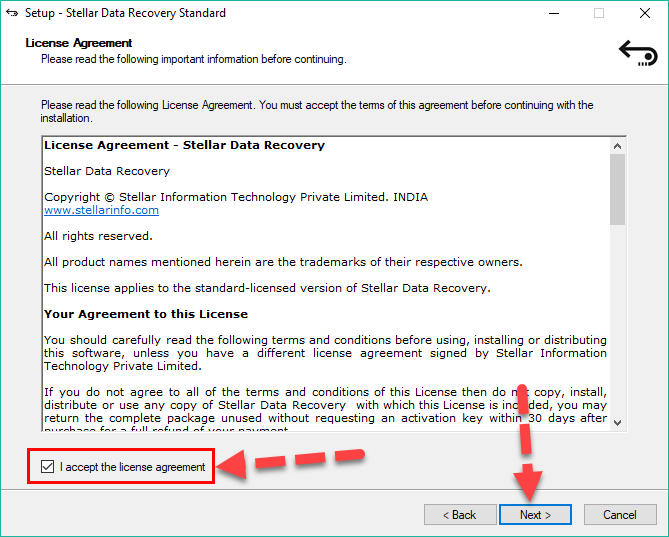 Agree to the License Agreement
 Step 4. Select the installation file and if you leave it as a default it will be good. Simply click next.
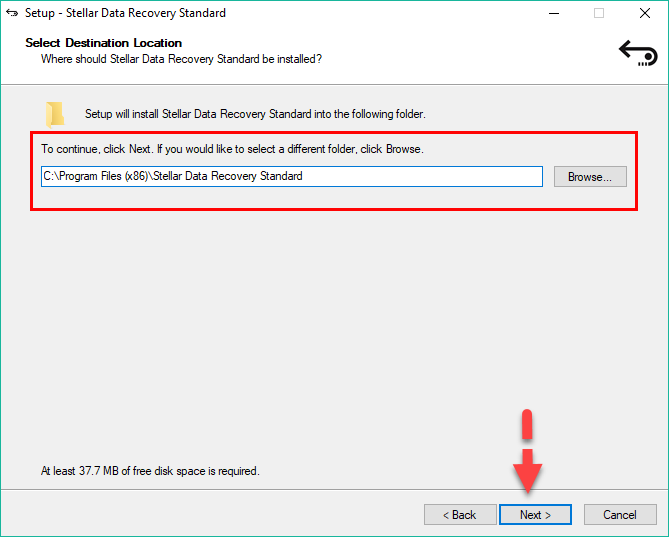 Select Destination Location
 Step 5. In this step, select the start menu folder from where you can start the Stellar Data Recovery.
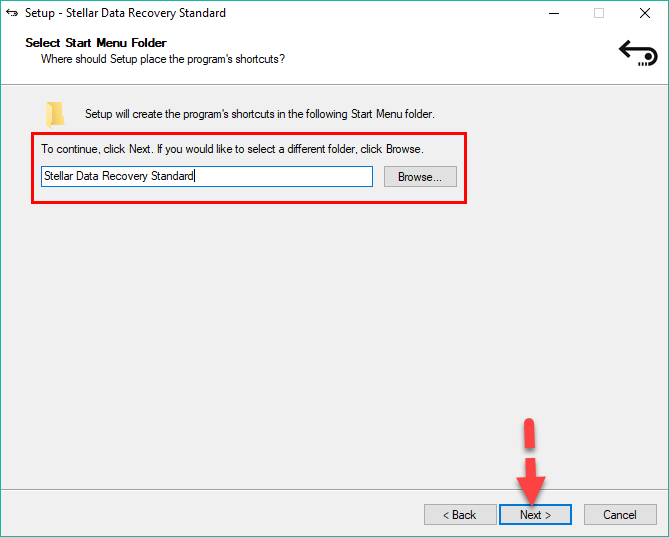 Select Start Menu Folder
 Step 6. In the window of Additional Tasks, you have select desktop icon because it will make a shortcut of Stellar Data Recovery on desktop. Then you need to click Next.
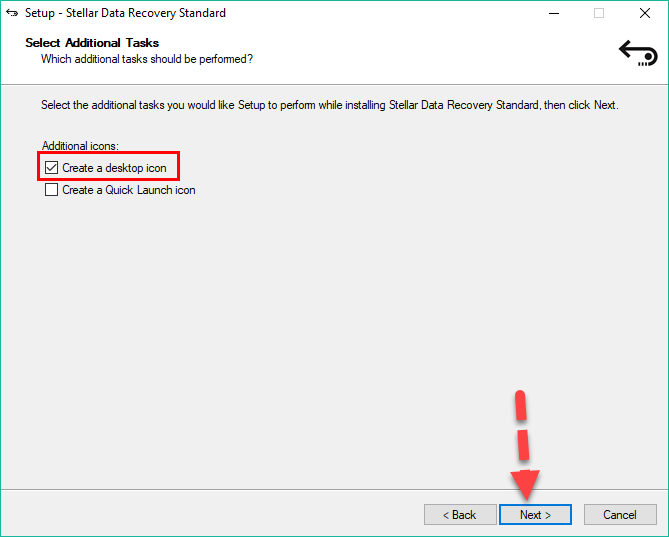 Select Additional Tasks
 Step 7. In the last step of installing Stellar Data Recovery, If you are ready to install it then simply click Install.
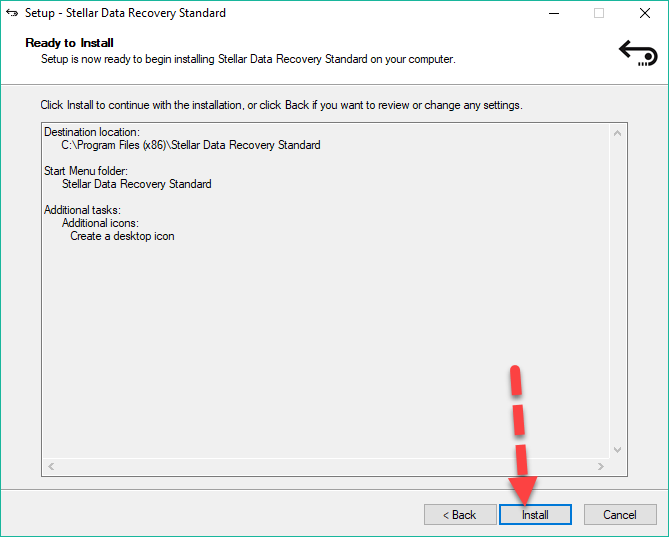 Install Stellar Data Recovery on your PC
 Recover Corrupted and Lost File using Stellar Data Recovery:
Step 1. When the downloading and installation is done, now it is time to recover the lost data with Stellar Data Recovery. So, the open the software and you will have many options if you lost your documents, folder, photos, and videos. Select any of them, I will simply select the Videos because I want to recover my videos which I lost. You can select any option and the all option have the same step which I will guide you below. And at last click Next.
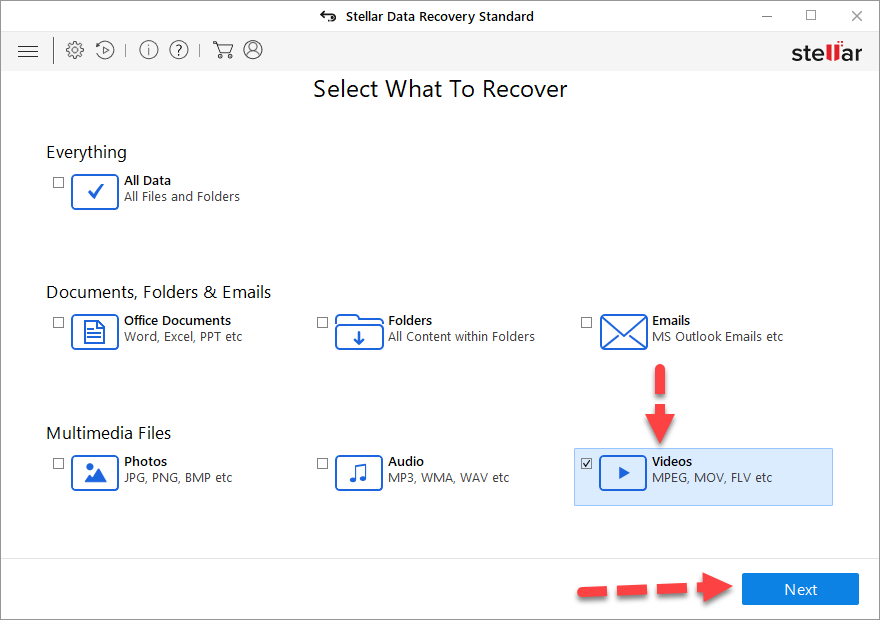 Select What to Recover
 Step 2. Then you have to select the location from where you have lost your data and it will recover it recover. Therefore, I will select the location of My Documents. And after that click on the Scan option.
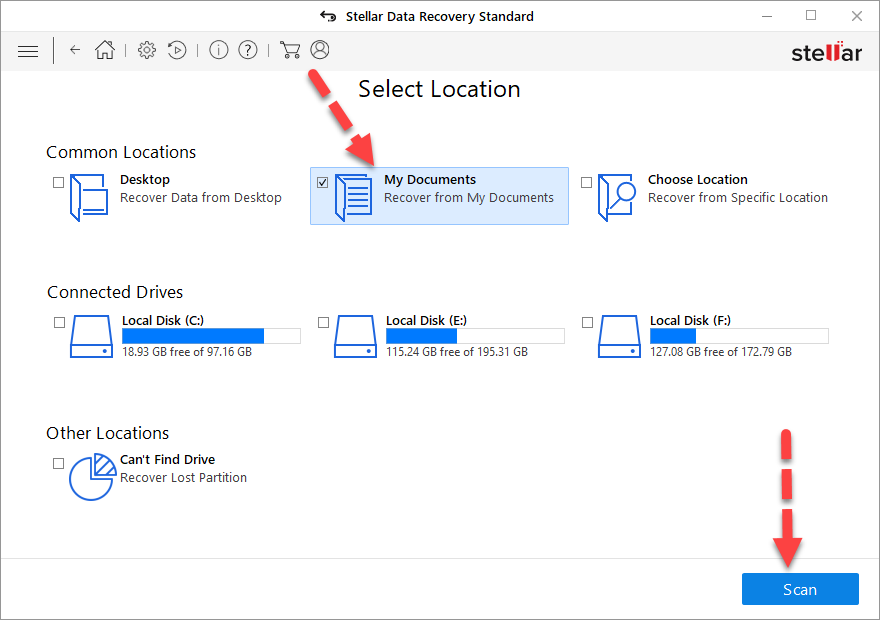 Select location to recover
 Step 3. When you click scan, then it will start to recover all the data which is on that location which you have selected. When the scanning is finished it will list all the files and data which you have lost Then you can pick one by one if it is important.
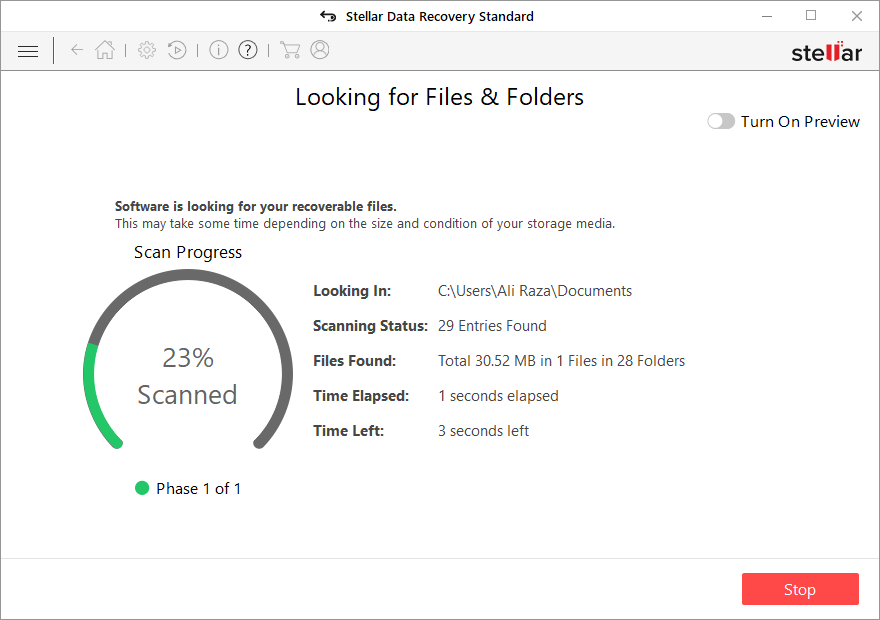 Recovering the files and folders
 Related:
How To Recover Deleted Files or Lost Files.
How To Become Keyboard Typing Master
Conclusion:
That’s all about How to Recover the Corrupted and Lost Data With Ease. So, I have explained and understood you each and everything deeply. If you faced any kind of problem regarding this you may comment. Don’t forget to comment on your feedback and subscribe to our blog.
Tagged
Share This Article
In this article, you will learn about How to Recover the Corrupted and Lost Data With Ease. Nowadays as we all know that technology is improving and providing us the best software. There is one amazing software which you can recover all the deleted files and it can also recover if the file is corrupted. Therefore, sometimes it might happen that the file is lost or accidentally deleted and you don’t have any idea about recovering the file. So, the file might be important to you but no worries we will guide you about it. The recovery software that I am going to guide you is one of the best software for and useful for everyone.
This software will help you to recover your all deleted files such as documents, videos, and photo, etc. You can recover all the files from Memory card, USB and external hard disk. Therefore, in this article, I will guide you each and everything below. And this software is free of cost and you can also download from below. I will guide from the installation of software up to recovering your personal file. Therefore, it doesn’t need any special pc to use it you need to have a normal pc.
Stellar Data Recovery:
The software which I am using to recover all files which are deleted. Therefore, I will also guide how to do it. The name of the software is Stellar Data Recovery. So, this software is mostly the windows user is using for data recovery You can also use it on the Mac and Linux operating system. So, download it from below and install it on your pc. The installation process is very easy but again I want to clear it for you in order not to have any kind of problem. And after the installation process, I will also guide you on how to recover deleted files from it which is very easy and understandable for everyone.
Stellar Data Recovery will also give you the option of Save Scan which is very useful for the user. When you scan your files and if you move your laptop here and there but again it can save that file without restarting your laptop. I will share with you guys more about the features of Stellar Data Recovery which must know before using it.
Features of Stellar Data Recovery:
CD DVD Recovery:
This feature allows quick recovery of important files, memorable photos, audios, videos, and other documents stored on your incorrectly burnt or severely damaged optical disc. You can use this feature to safely recover data from CDs, DVDs, Blu-ray discs, and HD DVDs.
Photo Recovery:
‘Photo Recovery’ allows recovery of pictures, movies, songs, and other multimedia files from Windows based drives and volumes. It supports a comprehensive list of a digital image, audio, and videos file formats. Further, it enables the selective recovery of images.
Email Recovery:
This feature will let you recover email file types such as EMLX,PST,MSG,EDB,MBOX, etc. from the MS-Outlook and Outlook Express.
Imaging:
‘Imaging’ enables you to create an image of your hard drive or a snapshot of any selected region on the drive. Any other software on the market cannot restore an image created using this software.
Resume Recovery:
The feature allows you to restart recovery at a convenient time using the image of a storage device or any previously saved scan information. In this way, you can perform recovery in two phases using the software.
RAW Recovery:
This feature will permit us to add or edit header for the RAW Recovery process.
Download Stellar Data Recovery:
For downloading this software you don’t need to waste your money because it is free of cost and it is also 100% secure to use it. However, you can download it from its own website Stellar Data Recovery Download. To download click on the Free and wait for the downloading. Therefore, the installation process follows each step below.
Install Stellar Data Recovery on your PC:
When the downloading is finished, you need to go to that which you have selected for downloads on your pc. Double-click on the setup of Stellar Data Recovery. And follow the step below
Step 1. First of all, when you double-click, then you need to select the language which you are good in. I simply select the English language.
Step 2. The welcome page will be opened, you have to click on the next to go one step forward.
Click Next Step 3. In License Agreement page you have to agree with that then click on Next.
Agree to the License Agreement Step 4. Select the installation file and if you leave it as a default it will be good. Simply click next.
Select Destination Location Step 5. In this step, select the start menu folder from where you can start the Stellar Data Recovery.
Select Start Menu Folder Step 6. In the window of Additional Tasks, you have select desktop icon because it will make a shortcut of Stellar Data Recovery on desktop. Then you need to click Next.
Select Additional Tasks Step 7. In the last step of installing Stellar Data Recovery, If you are ready to install it then simply click Install.
Install Stellar Data Recovery on your PC Recover Corrupted and Lost File using Stellar Data Recovery:
Step 1. When the downloading and installation is done, now it is time to recover the lost data with Stellar Data Recovery. So, the open the software and you will have many options if you lost your documents, folder, photos, and videos. Select any of them, I will simply select the Videos because I want to recover my videos which I lost. You can select any option and the all option have the same step which I will guide you below. And at last click Next.
Select What to Recover Step 2. Then you have to select the location from where you have lost your data and it will recover it recover. Therefore, I will select the location of My Documents. And after that click on the Scan option.
Select location to recover Step 3. When you click scan, then it will start to recover all the data which is on that location which you have selected. When the scanning is finished it will list all the files and data which you have lost Then you can pick one by one if it is important.
Recovering the files and folders Related:
How To Recover Deleted Files or Lost Files.
How To Become Keyboard Typing Master
Conclusion:
That’s all about How to Recover the Corrupted and Lost Data With Ease. So, I have explained and understood you each and everything deeply. If you faced any kind of problem regarding this you may comment. Don’t forget to comment on your feedback and subscribe to our blog.


