

How to Well Optimize Windows 10 Performance For Gaming 2021
 Azaz Shaikh
When you are playing the game on your PC then your PC is crash your game or your game is lagging. Lagging or crashing game is very bad and you don’t want to play more because of lag. However, when you try to optimize performance for gaming then you don’t the way that you can optimize performance for gaming. Once the game is a lot of lagging then you will go and search on YouTube after that the video you are watching maybe it will not work. But don’t worry I am here to solve your problem. If you want to well optimize Windows 10 performance for gaming then you need to read this article. So, without wasting any time let’s get has started. From this article, you will learn How to Well Optimize Windows 10 Performance For Gaming 2021.
Related Post: How to Enable Ultimate Power Plan on Windows 10
How to Uninstall Unnecessary Programs
You need to delete useless software that you don’t use then software.
Step 1. At first, you need to press Win + R then type at the search bar appwiz.cpl after that simply hit the Enter button.
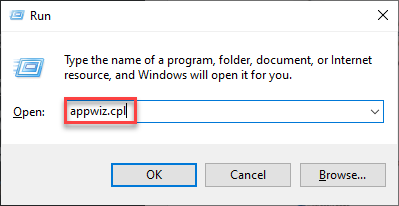 Hit The Enter Button
 Step 2. Now, find the software that you want to uninstall from your PC.
Step 3. Once, you find the software then right-click on the software after that click on the Uninstall.
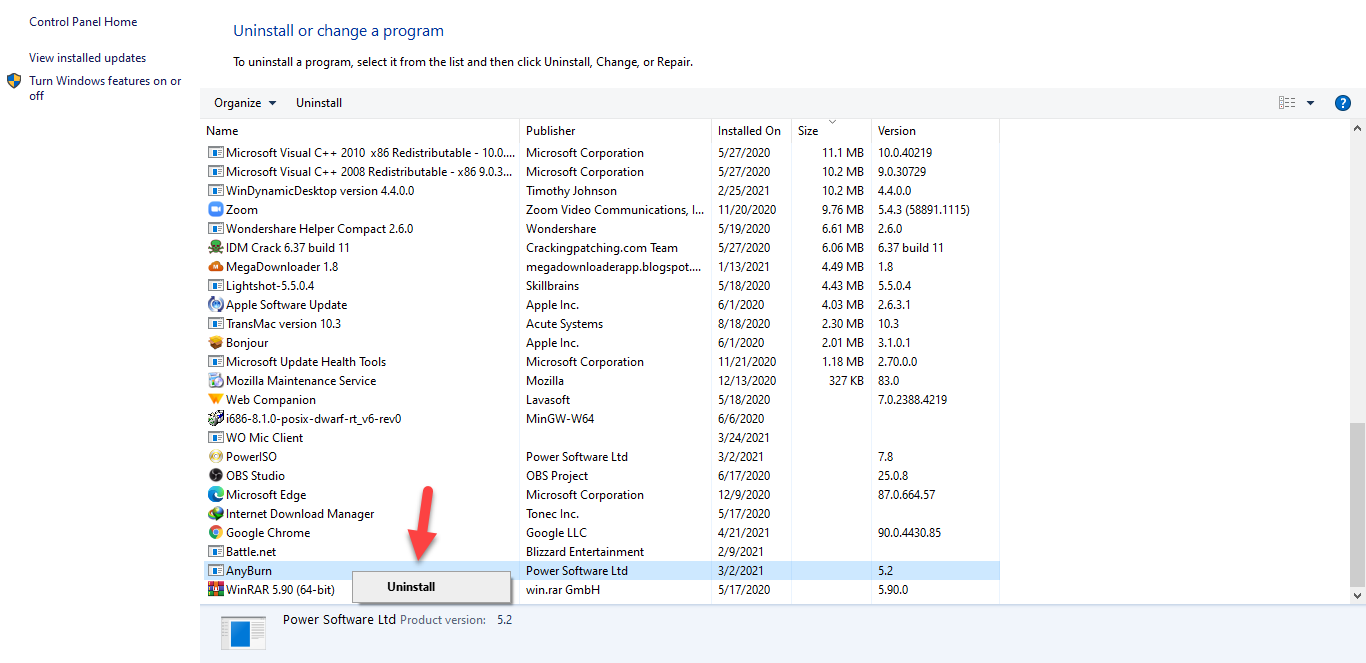 Click on the Uninstall
 How to Adjust PC for the Best Performance
Step 1. First of all, go to the Start Menu then type on the search bar Adjust the Appearance and Performance of Windows after that click on the Ok.
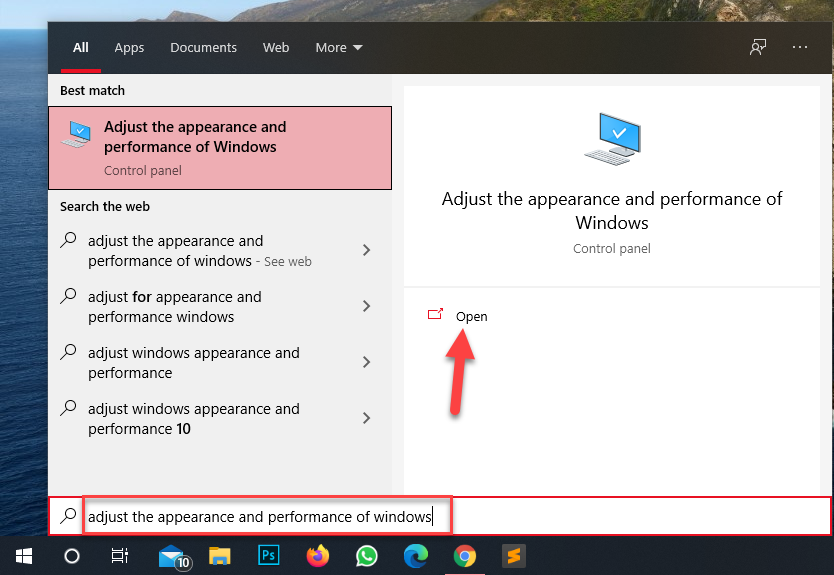 Click on the Open
 Step 2. Now, check the box of Adjust For The Best Performance then click on the Apply after that tap on the on Ok.
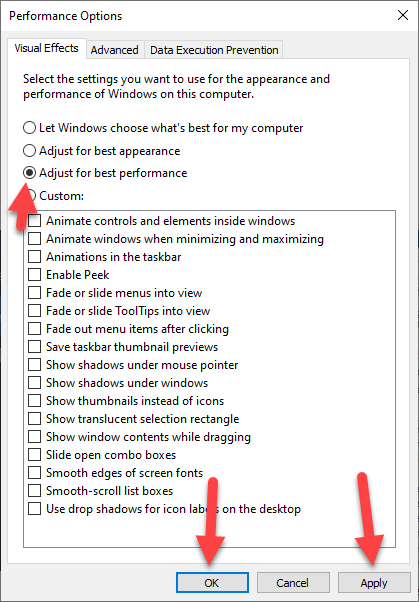 Tap on the Ok
 How to Disable Startup Programs
Step 1. At first, right-click on the Start Menu at the bottom left corner then click on the Task Manager.
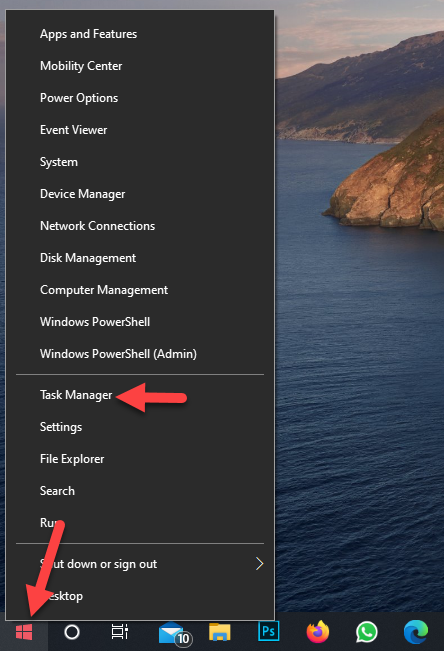 Click on the Task Manager
 Step 2. Next, click on the Startup from the menu tab.
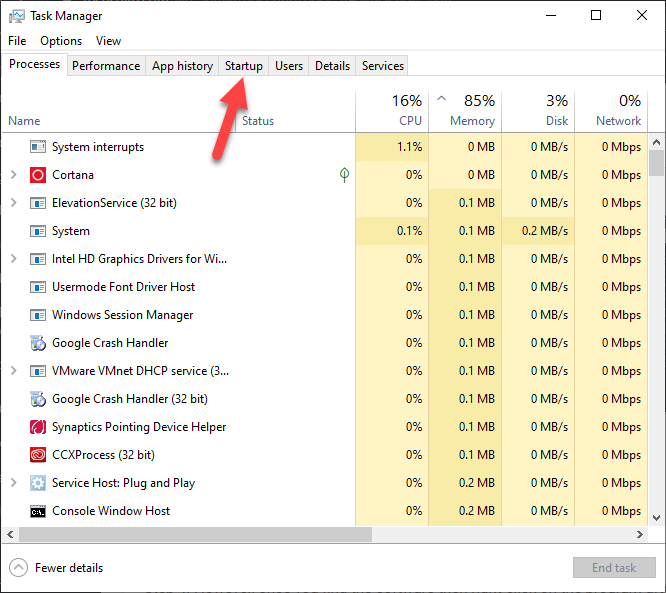 Click on the Startup
 Step 3. Find the program that you want to disable the software.
Step 4. However, once you find the software then right-click on the program after that tap on the Disable.
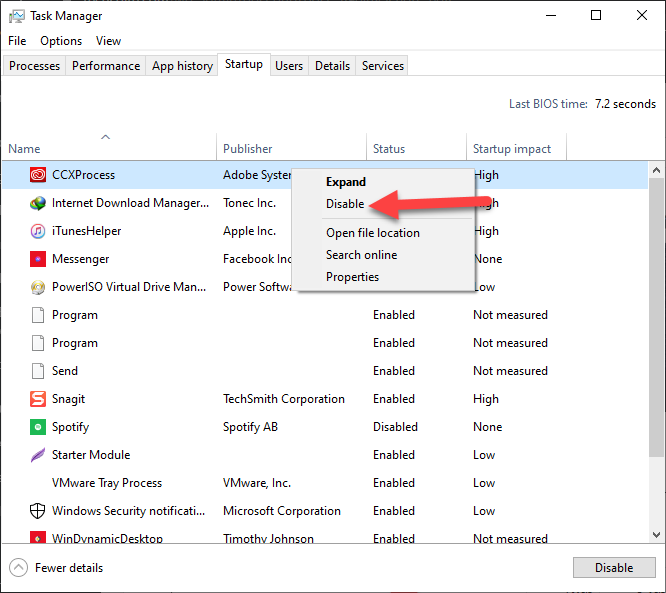 Click on the Disable
 Related Post: How to Install Windows 10 on a Mac With an M1 Chip
Bottom Line
It was all about How to Well Optimize Windows 10 Performance For Gaming 2021. I hope this article is very helpful for you to optimize Windows 10 performance. This is the right place to solve your problem. From this article, you will get some good. After following these steps I hope you will not face any kind of problem. So if you have faced any kind of problem and if you have any suggestions then go down leave your comment.
Related Post: 5 Best AdSense Alternatives to Consider for Your Websites in 2021
Tagged
Share This Article
When you are playing the game on your PC then your PC is crash your game or your game is lagging. Lagging or crashing game is very bad and you don’t want to play more because of lag. However, when you try to optimize performance for gaming then you don’t the way that you can optimize performance for gaming. Once the game is a lot of lagging then you will go and search on YouTube after that the video you are watching maybe it will not work. But don’t worry I am here to solve your problem. If you want to well optimize Windows 10 performance for gaming then you need to read this article. So, without wasting any time let’s get has started. From this article, you will learn How to Well Optimize Windows 10 Performance For Gaming 2021.
Related Post: How to Enable Ultimate Power Plan on Windows 10
How to Uninstall Unnecessary Programs
You need to delete useless software that you don’t use then software.
Step 1. At first, you need to press Win + R then type at the search bar appwiz.cpl after that simply hit the Enter button.
Hit The Enter Button Step 2. Now, find the software that you want to uninstall from your PC.
Step 3. Once, you find the software then right-click on the software after that click on the Uninstall.
Click on the Uninstall How to Adjust PC for the Best Performance
Step 1. First of all, go to the Start Menu then type on the search bar Adjust the Appearance and Performance of Windows after that click on the Ok.
Click on the Open Step 2. Now, check the box of Adjust For The Best Performance then click on the Apply after that tap on the on Ok.
Tap on the Ok How to Disable Startup Programs
Step 1. At first, right-click on the Start Menu at the bottom left corner then click on the Task Manager.
Click on the Task Manager Step 2. Next, click on the Startup from the menu tab.
Click on the Startup Step 3. Find the program that you want to disable the software.
Step 4. However, once you find the software then right-click on the program after that tap on the Disable.
Click on the Disable Related Post: How to Install Windows 10 on a Mac With an M1 Chip
Bottom Line
It was all about How to Well Optimize Windows 10 Performance For Gaming 2021. I hope this article is very helpful for you to optimize Windows 10 performance. This is the right place to solve your problem. From this article, you will get some good. After following these steps I hope you will not face any kind of problem. So if you have faced any kind of problem and if you have any suggestions then go down leave your comment.
Related Post: 5 Best AdSense Alternatives to Consider for Your Websites in 2021


