

How to Save Images in Google Photos to your iPhone
 Azaz Shaikh
Sometimes when you save your all photos in Google Photos because your photos are very safe. Once you save your photos then from your library of photos the photos will disappear because you will save your all photos to Google Photos. However, when you try to save images in Google Photos to your iPhone then you don’t know to save the photos to your iPhone. But don’t worry I will find a way that you can save images in google photos to your iPhone without using any third-party app. If you want to save images in google photos to your iPhone then you need to read this article. So, without wasting any time let’s get has started. From this article, you will learn How to Save Images in Google Photos to your iPhone.
What are Google Photos?
Google is available for the iPhone and tablets like the iPad for Apple devices and it’s also available in android devices actually on android here is the default app for photos called Google Photos. Now there are four really big benefits of Google Photos. The first one is a great way to free up space on your iPhone especially if you have an iPhone and you don’t have the upgraded iCloud to put your photos on there you could use Google photos completely for free. It has unlimited storage.
The second benefits of it are it’s one of the easiest ways I’ve ever found for syncing up your phone and your computer with the same photos library. Now the third benefit is it makes photo sharing so easy doesn’t matter if you do it on the computer or your phone photos sharing individual photos. And the four benefit it organizes things automatically in a way that it will take you forever to do.
Related Post: How to Lock Facebook Profile on iPhone Using the App and Browser
How to Save Images in Google Photos to your iPhone
Step 1. At first, open your Google Photos on your device.
Step 2. When Google Photos is open then click on the that you want to save after that tap on the Share at the bottom left corner.
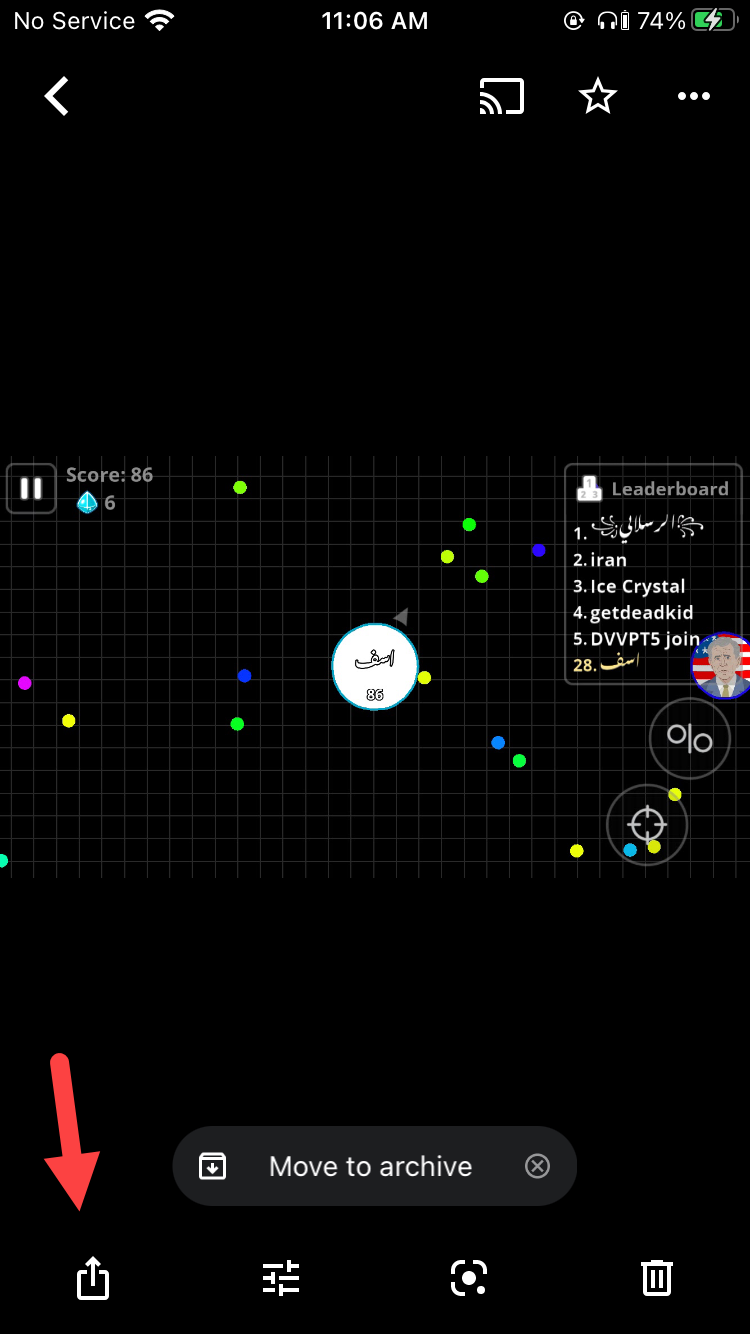 Tap on the Share
 Step 3. Now, you need to click on the Share to Device at the bottom of your screen.
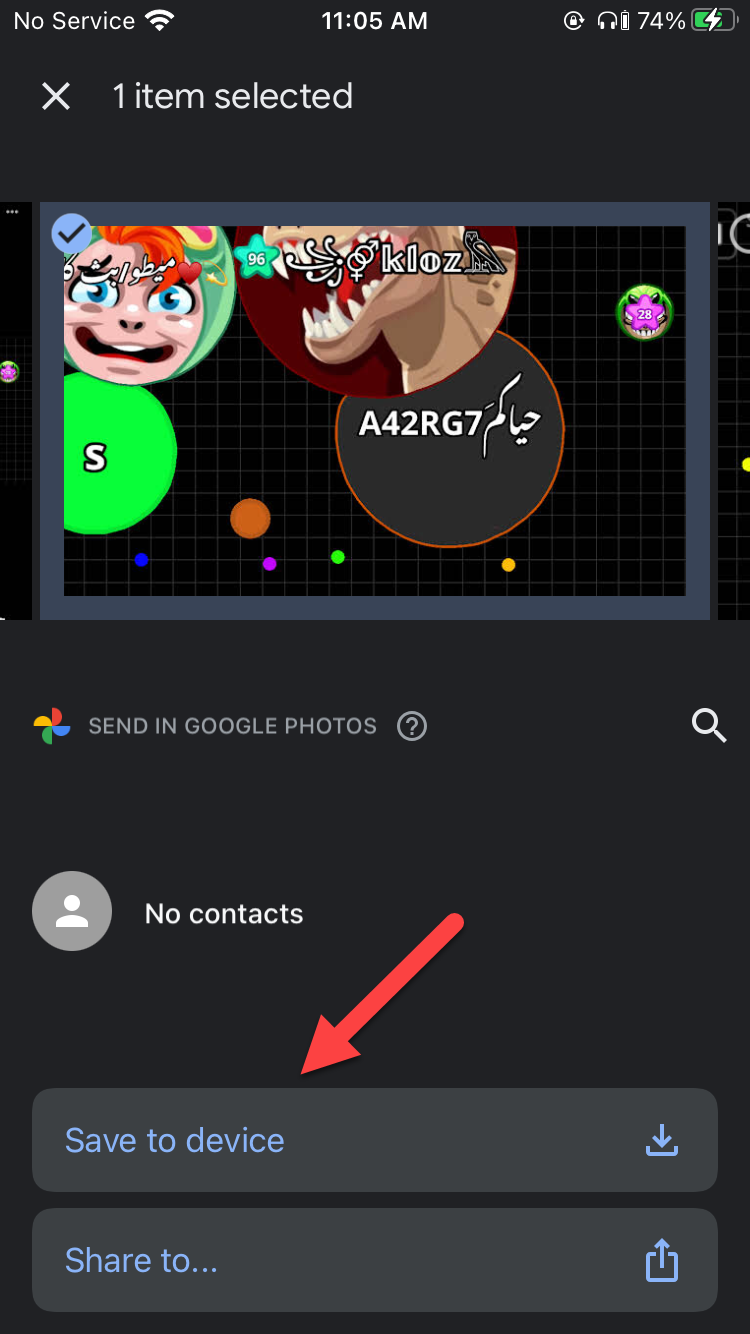 Click on the Save to Device
 Step 4. Once you click on the share to the device then you will get the photos on your library of your iPhone.
How to Save Multiple Images in Google Photos to your iPhone
Step 1. First of all, you need to open Google Photos on your iPhone.
Step 2. Long press on the photos that you want to save when you select the photos then you need to click on the Share at the top of your screen.
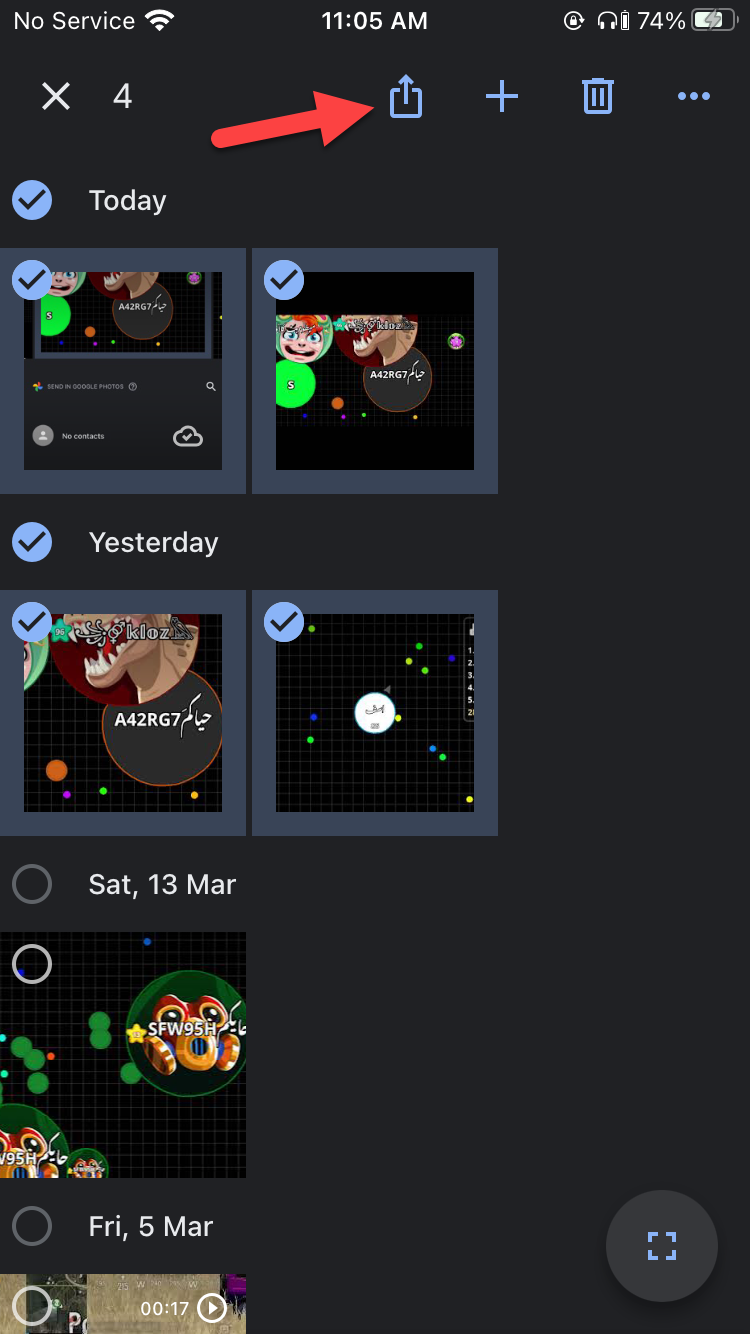 Click on the Share
 Step 3. When you click on the share then click on the Save to Device.
 Click on the Save to Device
 Related Post: How to Access your Computer from Anywhere with Google Chrome
Bottom Line
It was all about How to Save Images in Google Photos to your iPhone. I hope this article is very helpful for you to save images in google photos to your iPhone. From this article, you will get something good. After following these steps you will not face any kind of problem. So if you are faced with any kind of problem and if you have any suggestions then go down leave your comment.
Related Post: Best AdSense Alternative to Consider for Your Website in 2021
Share This Article
Sometimes when you save your all photos in Google Photos because your photos are very safe. Once you save your photos then from your library of photos the photos will disappear because you will save your all photos to Google Photos. However, when you try to save images in Google Photos to your iPhone then you don’t know to save the photos to your iPhone. But don’t worry I will find a way that you can save images in google photos to your iPhone without using any third-party app. If you want to save images in google photos to your iPhone then you need to read this article. So, without wasting any time let’s get has started. From this article, you will learn How to Save Images in Google Photos to your iPhone.
What are Google Photos?
Google is available for the iPhone and tablets like the iPad for Apple devices and it’s also available in android devices actually on android here is the default app for photos called Google Photos. Now there are four really big benefits of Google Photos. The first one is a great way to free up space on your iPhone especially if you have an iPhone and you don’t have the upgraded iCloud to put your photos on there you could use Google photos completely for free. It has unlimited storage.
The second benefits of it are it’s one of the easiest ways I’ve ever found for syncing up your phone and your computer with the same photos library. Now the third benefit is it makes photo sharing so easy doesn’t matter if you do it on the computer or your phone photos sharing individual photos. And the four benefit it organizes things automatically in a way that it will take you forever to do.
Related Post: How to Lock Facebook Profile on iPhone Using the App and Browser
How to Save Images in Google Photos to your iPhone
Step 1. At first, open your Google Photos on your device.
Step 2. When Google Photos is open then click on the that you want to save after that tap on the Share at the bottom left corner.
Tap on the Share Step 3. Now, you need to click on the Share to Device at the bottom of your screen.
Click on the Save to Device Step 4. Once you click on the share to the device then you will get the photos on your library of your iPhone.
How to Save Multiple Images in Google Photos to your iPhone
Step 1. First of all, you need to open Google Photos on your iPhone.
Step 2. Long press on the photos that you want to save when you select the photos then you need to click on the Share at the top of your screen.
Click on the Share Step 3. When you click on the share then click on the Save to Device.
Click on the Save to Device Related Post: How to Access your Computer from Anywhere with Google Chrome
Bottom Line
It was all about How to Save Images in Google Photos to your iPhone. I hope this article is very helpful for you to save images in google photos to your iPhone. From this article, you will get something good. After following these steps you will not face any kind of problem. So if you are faced with any kind of problem and if you have any suggestions then go down leave your comment.
Related Post: Best AdSense Alternative to Consider for Your Website in 2021


