

How to Make a Steam Account in 2021
 Azaz Shaikh
When you want to create a Steam account then you don’t know that how to create it. But don’t worry I am here to solve your problem to guide how to create a Steam account. If you want to download and create an account on Steam you need to read this article. So, without wasting any time let’s get has started. From this article, you will learn How to Make a Steam Account in 2021
What is Steam? It’s a social gaming website where you can buy, play and discuss games. Talk about a gamer’s paradise. Kids love these not only can they play their favorite games with friends they can chat with others, join, forums, learn about new games and play demos. Plus there’s more. Steam comes with parental controls called Steam family view, which limits what kids can download. It seems like a pretty cool platform. Well for the most part is it. But watch out for mature games and of course be mindful of download costs. Steam has daily 20 million active users.
Related Post: How to Know If Someone Blocked Your Number on Their Phone
How to Make a Steam Account
Step 1. First of all, open any browser then go to the search bar then type Steam after that tap on the first link.
Step 2. When the official website is open then click on the Install Steam at the top right corner.
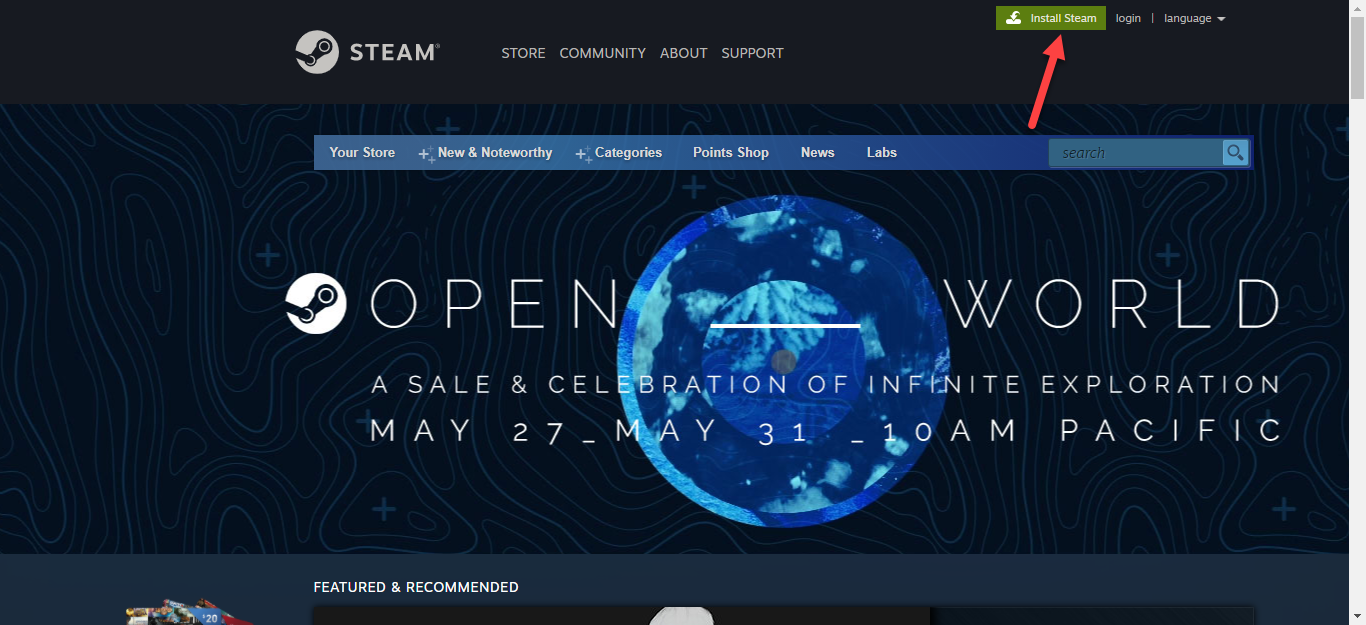 Click on the Steam
 Step 3. Click on the Install Steam.
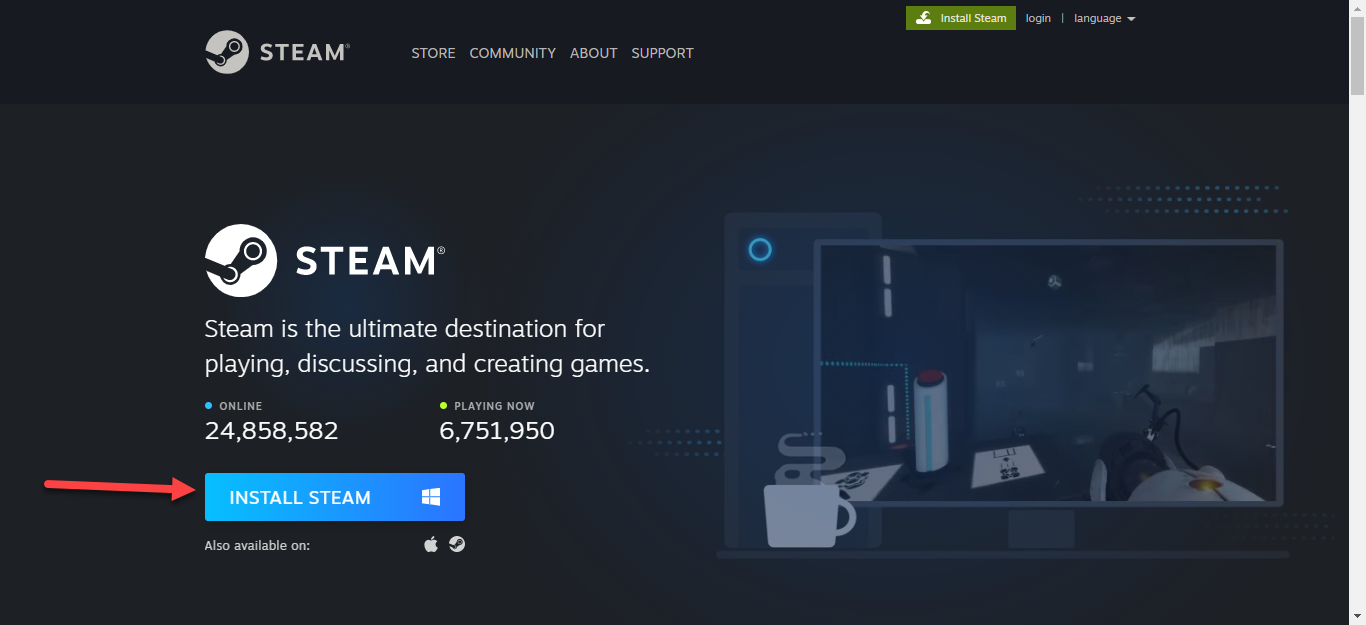 Click on the Install Steam
 Step 4. Now, till the exe file will install on your PC.
Step 5. Next, launch the Steam after that tap on the Next at the bottom left.
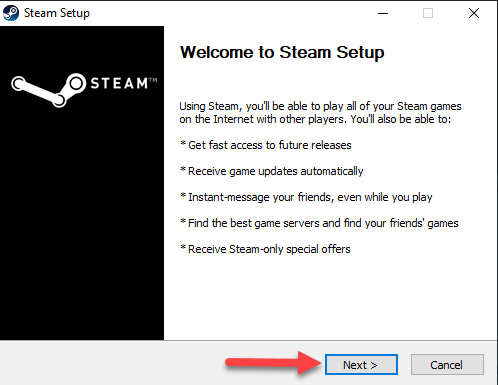 Tap on the Next
 Step 6. Choose your language after that click on the Next.
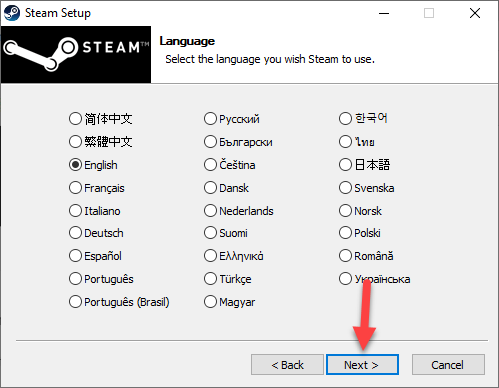 Click on the Next
 Step 7. Here in this step if you want to change the destination of the folder then click on the Browser after that click on the Install.
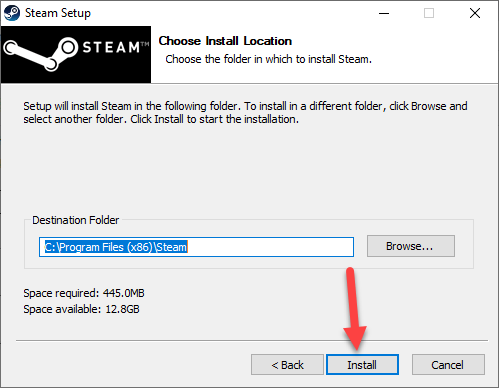 Click on the Install
 Step 8. Wait till the installation is done.
Step 9. Click on the Finish.
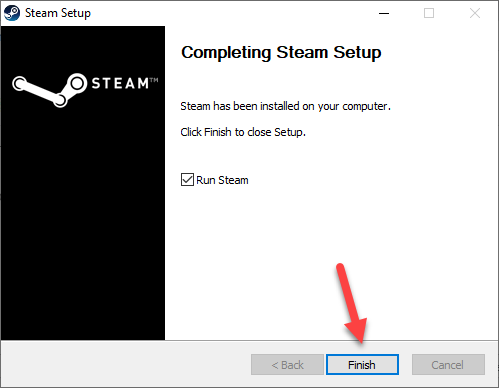 Click on the Finish
 Step 10. Now, you need to click on the Create New Account.
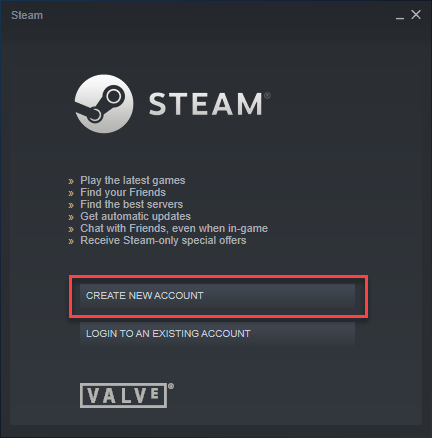 Click on the Create New Account
 Step 11. Next, type your Email Address, Confirm Your Address and Country of Residence, and at last, you need to show that you are not a robot by clicking on the I’m Not a Robot then click on the Continue at bottom of the page.
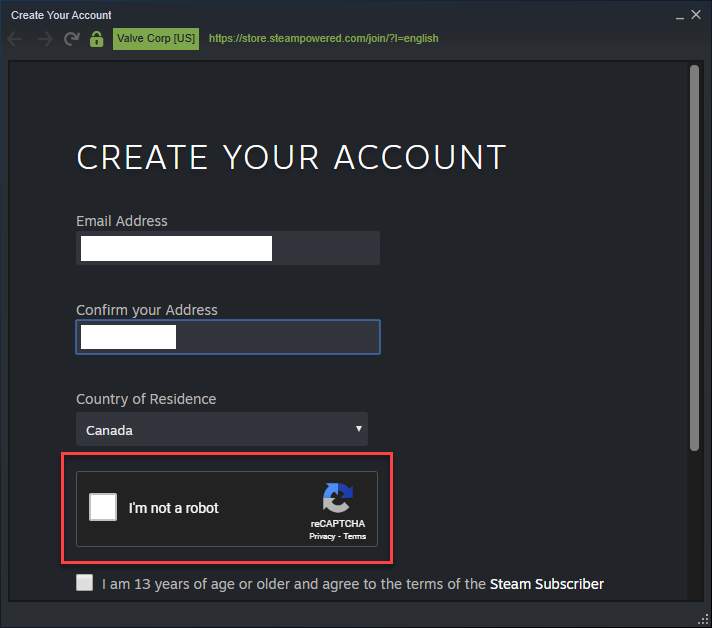
Step 12. When you click on the continue then go to the Gmail have you got the email from Steam open it. And, Click on the Verify My Email Address.
 Click on the Verify My Email Address
 Step 13. Once you click on the verify my email address. Then, close the email after that go to Steam.
Step 14. Type your Steam Account Name, Choose Password, and Confirm Password then click on the Done.
Step 15. Now, type the Account Name, and Password after that tap on the Login.
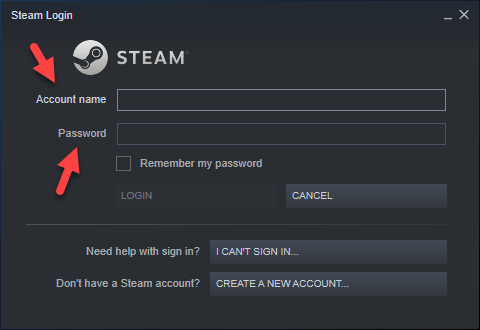 Tap on the Login
 Step 16. However, when you click on the login. Then, you will successfully create an account on Steam.
Related Post: How to Download and Install Telegram on Windows 10 PC
Bottom Line
It was all about How to Make a Steam Account in 2021. I hope this article is very helpful for you to download and create an account on Steam. From this article, you will get something good. This is the right place to solve your problem. After following these steps I hope you will not face any kind of problem. If you faced any kind of problem and if you have any type of suggestions then do comment.
Related Post: 5 Best Mice for Mac Users in 2021
Tagged
Share This Article
When you want to create a Steam account then you don’t know that how to create it. But don’t worry I am here to solve your problem to guide how to create a Steam account. If you want to download and create an account on Steam you need to read this article. So, without wasting any time let’s get has started. From this article, you will learn How to Make a Steam Account in 2021
What is Steam? It’s a social gaming website where you can buy, play and discuss games. Talk about a gamer’s paradise. Kids love these not only can they play their favorite games with friends they can chat with others, join, forums, learn about new games and play demos. Plus there’s more. Steam comes with parental controls called Steam family view, which limits what kids can download. It seems like a pretty cool platform. Well for the most part is it. But watch out for mature games and of course be mindful of download costs. Steam has daily 20 million active users.
Related Post: How to Know If Someone Blocked Your Number on Their Phone
How to Make a Steam Account
Step 1. First of all, open any browser then go to the search bar then type Steam after that tap on the first link.
Step 2. When the official website is open then click on the Install Steam at the top right corner.
Click on the Steam Step 3. Click on the Install Steam.
Click on the Install Steam Step 4. Now, till the exe file will install on your PC.
Step 5. Next, launch the Steam after that tap on the Next at the bottom left.
Tap on the Next Step 6. Choose your language after that click on the Next.
Click on the Next Step 7. Here in this step if you want to change the destination of the folder then click on the Browser after that click on the Install.
Click on the Install Step 8. Wait till the installation is done.
Step 9. Click on the Finish.
Click on the Finish Step 10. Now, you need to click on the Create New Account.
Click on the Create New Account Step 11. Next, type your Email Address, Confirm Your Address and Country of Residence, and at last, you need to show that you are not a robot by clicking on the I’m Not a Robot then click on the Continue at bottom of the page.
Step 12. When you click on the continue then go to the Gmail have you got the email from Steam open it. And, Click on the Verify My Email Address.
Click on the Verify My Email Address Step 13. Once you click on the verify my email address. Then, close the email after that go to Steam.
Step 14. Type your Steam Account Name, Choose Password, and Confirm Password then click on the Done.
Step 15. Now, type the Account Name, and Password after that tap on the Login.
Tap on the Login Step 16. However, when you click on the login. Then, you will successfully create an account on Steam.
Related Post: How to Download and Install Telegram on Windows 10 PC
Bottom Line
It was all about How to Make a Steam Account in 2021. I hope this article is very helpful for you to download and create an account on Steam. From this article, you will get something good. This is the right place to solve your problem. After following these steps I hope you will not face any kind of problem. If you faced any kind of problem and if you have any type of suggestions then do comment.
Related Post: 5 Best Mice for Mac Users in 2021


