

How to Hide Photos on Your iPhone (Updated for iOS 14)
 Azaz Shaikh
Most of the iPhone users need to know about hiding photos on iPhone. Hiding your personal photos will be great to keep them secure from unknown people. While iPhone is somehow complicated because it doesn’t allow us easily which we want it. Hiding photos on other operating systems are somehow simple and easy but on iPhone (iOS 14) the task is pretty difficult. The problem is here that iPhone doesn’t offer an accurate way of hiding. You don’t have to worry because I am going to show you How to Hide Photos on Your iPhone (Updated for iOS 14).
However, Apple allows users to create a photo album and can easily hide your photos. We will guide you with the many methods which are very easy. Keep following the steps down below and hide the photos on your iPhone.
How to Hide Photos in IOS 14
- Turn on your iPhone (iOS 14), and open the Photos app from the apps menu.
- On the Photos app, you have to tap on the Select from the top-right corner and select all those photos which you want to hide.
- Then, tap on the Share option from the bottom left corner.
- Scroll down and tap on the Hide option.
- Again tap on the Hide Photo to confirm that.
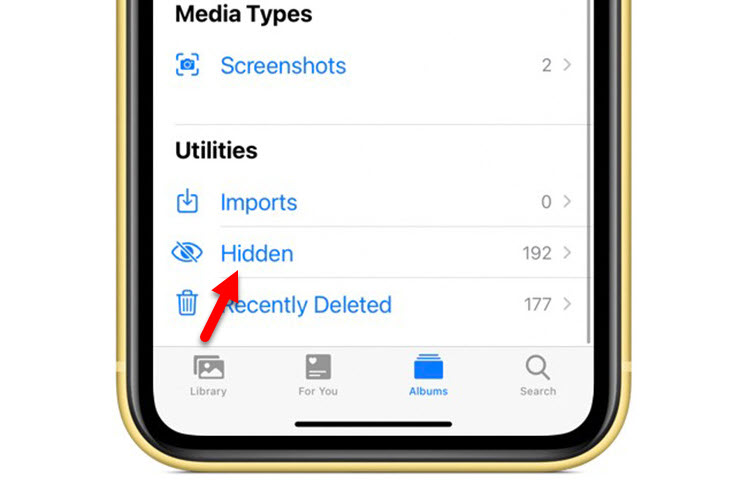
The problem is here that most of the people don’t know where hide photos went. Because it won’t show up the photo in the camera roll. Basically, you can easily find out all those hidden photos by viewing your hidden folder which is located at the Albums.
 Hidden
 Best Apps to Hide Photos & Videos on iPhone
The above method is really best because it doesn’t require any third-party app. But you can’t lock the photos once it is hidden. However, Most of the people are looking for apps to lock the photos with a password. The apps will keep the photos private on your iPhone. Only you can access it because you know the password. If you want to lock the photos then it is the only and smart solution because the iPhone doesn’t offer such things.
Well, finding the best app for the users is a difficult task because on App Store you will find various kinds of app. Don’t worry because I will help you to choose the right and a great one. I am going to introduce three different apps that will help you hide your photos and lock it. Tap on the link below and install any of the apps.
- Secret Photo Vault (Free and Premium starts with $3.99/Month)
- Best Secret Folder (Free)
- Private Photo Vault Pro ($6.99)
Bottom Line
It was the complete guide on How to Hide Photos on Your iPhone (Updated for iOS 14). I have described two different methods which will help you to hide your photos. Hiding photos is a great way to keep personal photos private from unknown people. However, I hope you have found this guide helpful. If you have any problem then don’t hesitate to leave comments in the comment section down below.
Recommended Guide: How to lock apps on iPhone in 2020?
Share This Article
Most of the iPhone users need to know about hiding photos on iPhone. Hiding your personal photos will be great to keep them secure from unknown people. While iPhone is somehow complicated because it doesn’t allow us easily which we want it. Hiding photos on other operating systems are somehow simple and easy but on iPhone (iOS 14) the task is pretty difficult. The problem is here that iPhone doesn’t offer an accurate way of hiding. You don’t have to worry because I am going to show you How to Hide Photos on Your iPhone (Updated for iOS 14).
However, Apple allows users to create a photo album and can easily hide your photos. We will guide you with the many methods which are very easy. Keep following the steps down below and hide the photos on your iPhone.
How to Hide Photos in IOS 14
- Turn on your iPhone (iOS 14), and open the Photos app from the apps menu.
- On the Photos app, you have to tap on the Select from the top-right corner and select all those photos which you want to hide.
- Then, tap on the Share option from the bottom left corner.
- Scroll down and tap on the Hide option.
- Again tap on the Hide Photo to confirm that.
The problem is here that most of the people don’t know where hide photos went. Because it won’t show up the photo in the camera roll. Basically, you can easily find out all those hidden photos by viewing your hidden folder which is located at the Albums.
Hidden Best Apps to Hide Photos & Videos on iPhone
The above method is really best because it doesn’t require any third-party app. But you can’t lock the photos once it is hidden. However, Most of the people are looking for apps to lock the photos with a password. The apps will keep the photos private on your iPhone. Only you can access it because you know the password. If you want to lock the photos then it is the only and smart solution because the iPhone doesn’t offer such things.
Well, finding the best app for the users is a difficult task because on App Store you will find various kinds of app. Don’t worry because I will help you to choose the right and a great one. I am going to introduce three different apps that will help you hide your photos and lock it. Tap on the link below and install any of the apps.
- Secret Photo Vault (Free and Premium starts with $3.99/Month)
- Best Secret Folder (Free)
- Private Photo Vault Pro ($6.99)
Bottom Line
It was the complete guide on How to Hide Photos on Your iPhone (Updated for iOS 14). I have described two different methods which will help you to hide your photos. Hiding photos is a great way to keep personal photos private from unknown people. However, I hope you have found this guide helpful. If you have any problem then don’t hesitate to leave comments in the comment section down below.
Recommended Guide: How to lock apps on iPhone in 2020?


