

TechSpite
TechSpite
Contact
  • Home
  • About Us
  • How To
  • Windows
  • MAC OS
  • iOS

About TechSpite

  • About Us
  • Contact

Explore Topics

  • Conversational AI – Game Changer Talking Tech
  • Top Business Intelligence Tools For Data Analysis
  • How RPA Enhances Customer Service
  • Understanding Autonomous Vehicle Technology

Help & Support

  • Contact

Terms & Privacy

  • Privacy Policy
  • Terms & Conditions
  • Return and Refund Policy
TechSpite

© 2025 TechSpite. All rights reserved.

TOP
  1. Home
  2. /
  3. How To
  4. /
  5. How to FaceTime From an iPhone to Android?
How To

How to FaceTime From an iPhone to Android?

Azaz ShaikhAzaz Shaikh
•Oct 27, 2021•2 MIN READ
How to FaceTime From an iPhone to Android?

In this article, you will learn How to FaceTime From an iPhone to Android. FaceTime was the best app on the time quarantine because most of the people are taking their class by FaceTime. And you can also join a class. However, if you want to talk with anyone simply easy just create a link that you can easily because it is easy to use. Some of the people want to FaceTime from an iPhone to Android because someone wants to talk. If you want to FaceTime from an iPhone to Android then you need to read this article. So, without wasting any time let’s get has started.

How to FaceTime From an iPhone to Android

Step 1. First of all, you need to open FaceTime on your iPhone.

Step 2. Once FaceTime is launched then simply click on the Create Link.

Click on the Create Link

Step 3. Now, click on the Add Name then give any name that you want after that click on the Ok.
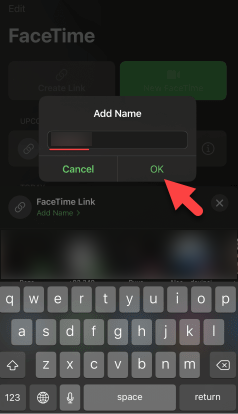
Click on the Ok

Step 4. Next, select the app where you want to send it.

Step 5. At last, click on the Send at the top right corner.

FaceTime From an iPhone to AndroidClick on the Send

Step 6. Now, open the app that you send a link to on your Android phone.

Step 7. Then click on the Link.

FaceTime From an iPhone to AndroidClick on the Link

Step 8. However, enter your name then click on the Continue.

FaceTime From an iPhone to AndroidClick on the Continue

Step 9. Tap on the Join at the top right.

Step 10. Here from your iPhone, you need to accept the request.

Step 11. Lastly, click on the Join on your iPhone.

Step 12. If you want to stop your talking then simply click on the Leave.

Bottom Line

It was all about to How to FaceTime From an iPhone to Android. I hope this article is very helpful for you to FaceTime from an iPhone to Android. From this article, you will get something good. This is the right place where you can easily solve your problem. After following these steps I hope you will not face any kind of problem. If you faced any kind of problem and if you have any type of suggestions then do comment.

Related Posts:

  • How to Check HP Laptop Battery Health on Windows 11
  • Organic Ways to Boost Your Instagram Following

Tagged

#Android#FaceTime#FaceTime From an iPhone to Android#FaceTime From iPhone#How to#iOS#iOS 15#iPhone

Share This Article

Recent Articles

Fresh content from our blog

Instagram Marketing: 10 Trends To Follow In 2023
Featured

Instagram Marketing: 10 Trends To Follow In 2023

May 23, 2023
11 Must-Know TikTok Tips for Going Viral!
Featured

11 Must-Know TikTok Tips for Going Viral!

May 17, 2023
17 Epic Facebook Tips And Tricks You Never Knew Existed!
Featured

17 Epic Facebook Tips And Tricks You Never Knew Existed!

May 14, 2023
12 Beginner-Friendly iPhone Photography Tips for Instagram
Featured

12 Beginner-Friendly iPhone Photography Tips for Instagram

May 3, 2023
12 Windows 11 Tips and Tricks To Make Your PC Awesome!
Featured

12 Windows 11 Tips and Tricks To Make Your PC Awesome!

May 1, 2023

In this article, you will learn How to FaceTime From an iPhone to Android. FaceTime was the best app on the time quarantine because most of the people are taking their class by FaceTime. And you can also join a class. However, if you want to talk with anyone simply easy just create a link that you can easily because it is easy to use. Some of the people want to FaceTime from an iPhone to Android because someone wants to talk. If you want to FaceTime from an iPhone to Android then you need to read this article. So, without wasting any time let’s get has started.

How to FaceTime From an iPhone to Android

Step 1. First of all, you need to open FaceTime on your iPhone.

Step 2. Once FaceTime is launched then simply click on the Create Link.

Click on the Create Link

Step 3. Now, click on the Add Name then give any name that you want after that click on the Ok.

Click on the Ok

Step 4. Next, select the app where you want to send it.

Step 5. At last, click on the Send at the top right corner.

FaceTime From an iPhone to AndroidClick on the Send

Step 6. Now, open the app that you send a link to on your Android phone.

Step 7. Then click on the Link.

FaceTime From an iPhone to AndroidClick on the Link

Step 8. However, enter your name then click on the Continue.

FaceTime From an iPhone to AndroidClick on the Continue

Step 9. Tap on the Join at the top right.

Step 10. Here from your iPhone, you need to accept the request.

Step 11. Lastly, click on the Join on your iPhone.

Step 12. If you want to stop your talking then simply click on the Leave.

Bottom Line

It was all about to How to FaceTime From an iPhone to Android. I hope this article is very helpful for you to FaceTime from an iPhone to Android. From this article, you will get something good. This is the right place where you can easily solve your problem. After following these steps I hope you will not face any kind of problem. If you faced any kind of problem and if you have any type of suggestions then do comment.

Related Posts:

  • How to Check HP Laptop Battery Health on Windows 11
  • Organic Ways to Boost Your Instagram Following

Tagged

#Android#FaceTime#FaceTime From an iPhone to Android#FaceTime From iPhone#How to#iOS#iOS 15#iPhone

Share This Article

Recent Articles

Fresh content from our blog

Instagram Marketing: 10 Trends To Follow In 2023
Featured

Instagram Marketing: 10 Trends To Follow In 2023

May 23, 2023
11 Must-Know TikTok Tips for Going Viral!
Featured

11 Must-Know TikTok Tips for Going Viral!

May 17, 2023
17 Epic Facebook Tips And Tricks You Never Knew Existed!
Featured

17 Epic Facebook Tips And Tricks You Never Knew Existed!

May 14, 2023
12 Beginner-Friendly iPhone Photography Tips for Instagram
Featured

12 Beginner-Friendly iPhone Photography Tips for Instagram

May 3, 2023
12 Windows 11 Tips and Tricks To Make Your PC Awesome!
Featured

12 Windows 11 Tips and Tricks To Make Your PC Awesome!

May 1, 2023

About the Author

Azaz Shaikh

About Azaz Shaikh

Azaz Shaikh is a contributor to this blog, sharing expertise and insights on tech solutions.

You Might Also Like

How to change message background on Android
Android

How to change message background on Android

In the digital age, personalization is key. From customizing your ringtones to wallpapers that grace your screens, we love making our devices uniquely ours. One such personal touch that often gets overlooked is the background of text messages on Android. Gone are the days when users were confined to the standard, monotonous backgrounds that came

Sep 28, 2023
The Ultimate Guide to Casting Oculus Quest 2 to Firestick: Unlock a Whole New Dimension of VR
Entertainment

The Ultimate Guide to Casting Oculus Quest 2 to Firestick: Unlock a Whole New Dimension of VR

Virtual reality has become incredibly popular captivating users with its thrilling and immersive experiences that are truly unprecedented. There are two known devices that allow people to enter this world; the Oculus Quest 2 and the Amazon Firestick. In this guide, we will delve into the steps involved in casting your Oculus Quest 2 to

Sep 21, 2023
10 Best LinkedIn Tips To Boost Career Opportunities
Featured

10 Best LinkedIn Tips To Boost Career Opportunities

With over 700 million professionals on its platform, LinkedIn has become a powerhouse for networking, job hunting, and professional growth. This ultimate guide will help you explore the top 10 LinkedIn tips that can significantly boost your career opportunities in every possible way.  Did you know that LinkedIn has witnessed a staggering 55 million companies

May 19, 2023

Comments

Leave a Comment

Share your thoughts and join the conversation

Your email address will not be published. All fields marked with * are required.
