

How to Download Facebook Videos Using Snaptube
 Azaz Shaikh
When someone uses a mobile phone then know about Facebook. Facebook is the best platform for video sharing and this face is very popular from all over the world. If you are using Facebook then someone shares any video or song then you need to download that video. But I will find for you the best app to download Facebook videos. However, if you want to download Facebook videos then it’s very easy to download videos. If you want to download it then I will find for you the best application Then you can easily download it without facing any kind of problem. here are times when users want to download a video from Facebook in HD. From this article, you will learn How to Download Facebook Videos Using Snaptube.
If you want to download Snaptube then it’s free to download Snaptube. With the help of Snaptube, you can download videos on Facebook, youtube much more things. When you download videos on YouTube and Facebook using Snaptube then you can easily choose the quality of your video. Basically, Snaptube is the best video downloader you can easily download any kind of video and song without facing any kind of problem.
Here is the Website of Snaptube
How to Download Facebook Videos Using Snaptube
Step 1. Open your Snaptube then click on the Facebook Icon.
Step 2. If you click on the Facebook icon then log in to your Facebook that you before that account. When you write an email or password the click on the login.
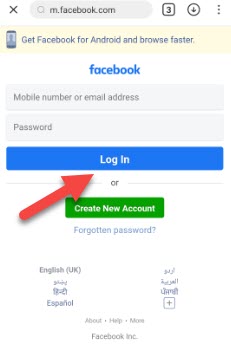 Click on the Log in
Step 3. When you are open then find the song and video that you want to download.
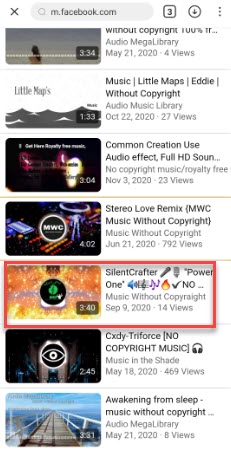 Find the Video That you Want to Download
Step 4. When you find the video and song then click on the Download.
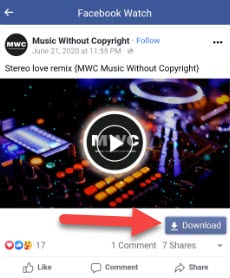 Click on the Download
Step 5. Once you click on the download then choose the quality of your video.
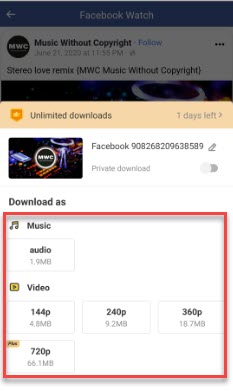 Choose the Quality of Your Video
Step 6. Wait a while for downloading.
Step 7. Click on the My Files then you will all the downloaded video.
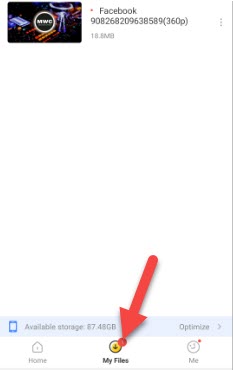 Click on the My Files
Related Guide:
How to Remove or Unlink Microsoft Account From Windows 10
How to Download a Windows 10 ISO Without the Media Creation Tool
Hide Apps on Android and How to Show Them Back
Bottom Line
It was all about How to Download Facebook Videos Using Snaptube. There is the step by step to download Facebook videos using Snaptube. After following these steps you will successfully download Facebook videos. So if you are faced with any kind of problem and if you have any suggestions then go down leave your comment.
Share This Article
When someone uses a mobile phone then know about Facebook. Facebook is the best platform for video sharing and this face is very popular from all over the world. If you are using Facebook then someone shares any video or song then you need to download that video. But I will find for you the best app to download Facebook videos. However, if you want to download Facebook videos then it’s very easy to download videos. If you want to download it then I will find for you the best application Then you can easily download it without facing any kind of problem. here are times when users want to download a video from Facebook in HD. From this article, you will learn How to Download Facebook Videos Using Snaptube.
If you want to download Snaptube then it’s free to download Snaptube. With the help of Snaptube, you can download videos on Facebook, youtube much more things. When you download videos on YouTube and Facebook using Snaptube then you can easily choose the quality of your video. Basically, Snaptube is the best video downloader you can easily download any kind of video and song without facing any kind of problem.
Here is the Website of Snaptube
How to Download Facebook Videos Using Snaptube
Step 1. Open your Snaptube then click on the Facebook Icon.
Step 2. If you click on the Facebook icon then log in to your Facebook that you before that account. When you write an email or password the click on the login.
Click on the Log in
Step 3. When you are open then find the song and video that you want to download.
Find the Video That you Want to Download
Step 4. When you find the video and song then click on the Download.
Click on the Download
Step 5. Once you click on the download then choose the quality of your video.
Choose the Quality of Your Video
Step 6. Wait a while for downloading.
Step 7. Click on the My Files then you will all the downloaded video.
Click on the My Files
Related Guide:
How to Remove or Unlink Microsoft Account From Windows 10
How to Download a Windows 10 ISO Without the Media Creation Tool
Hide Apps on Android and How to Show Them Back
Bottom Line
It was all about How to Download Facebook Videos Using Snaptube. There is the step by step to download Facebook videos using Snaptube. After following these steps you will successfully download Facebook videos. So if you are faced with any kind of problem and if you have any suggestions then go down leave your comment.


