

How to Fix Google Drive Download Limit, Quota Exceeded Error
 Azaz Shaikh
You might have download the file from Google Drive. If yes then sometimes definitely you will face the error while downloading the file which is Download Quota exceeded for this file, so you can’t download it at this time. So, Google Drive is the platform where you can save and store your files without any problem. And it will give space free up to 15GB. You might know about it because you can upload many files like software, video, and documents and you can share with your family members and friends easily. Therefore, in this article, I am going to guide you How to Fix Google Drive Download Limit, Quota Exceeded Error.
Fix Google Drive Download Limit, Quota Exceeded Error
As I have researched that people are using Google Drive for different purposes and everyone is free to upload, download and share with your friends and family. You can share with a large number of people around the world. If too many people download the file which you have shared then the file will be blocked. When a large number of users views or downloads a file, the file may be locked for a 24 hour period before the quota is reset. So, if the file is popular and important that has high traffic on it, it might take days or more than it to download it again from Google Drive. Therefore, when more users come to that file then Google will give the strike to Google because Google Drive has a download limit. If you cross the limit then you will face such a problem.
Related:
How to Fix Google Drive Download Limit, Quota Exceeded Error
Step 1. You need to create a Gmail account for yourself then login to Google Drive.
Step 2. So, after signing into Google Drive, then you need to go to the Shared Google Drive which you want to download. If it gives error by the name of Download Quota exceeded for this file, so you can’t download it at this time. You have to be signed in in order to copy someones else file to your Google Drive. So, For copying the file you need to right-click on the file. Then you will see the option of Make a Copy click on that in order to have a copy of the file in your own drive.
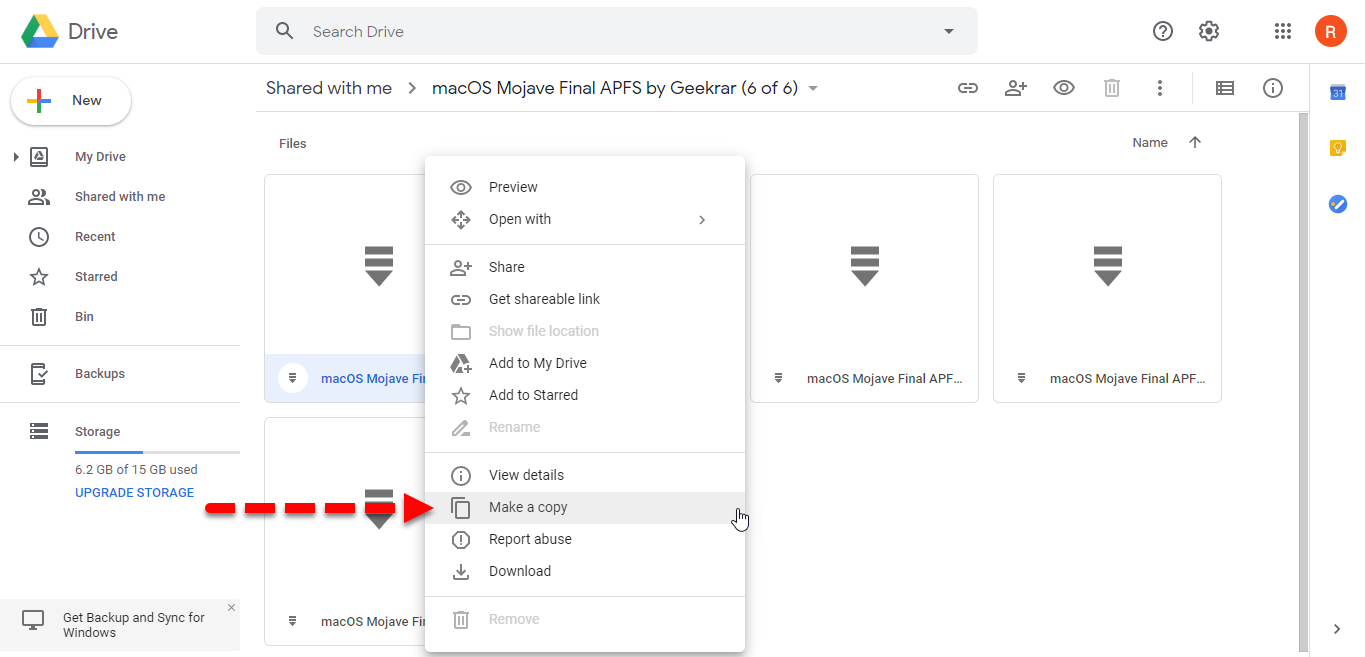 Make Copy
 Step 3. When you clicked on the Make a copy then you will see the notification on the left-bottom of the screen your computer. Which has created a copy of the fil in your Drive for that you need to click on the Show File Location or you can directly go to the My drive.
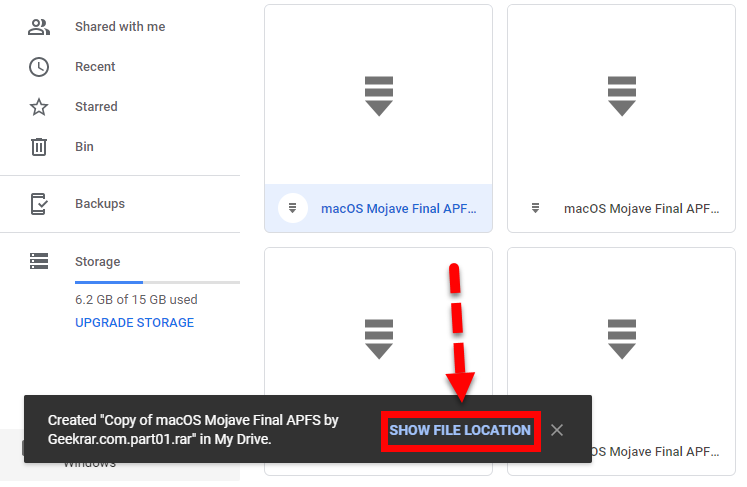 Show File Location
 Step 4. After that, the file is successfully the copy of the file has created on your Drive. For downloading the copy file you need to right-click on that and click on the download option.
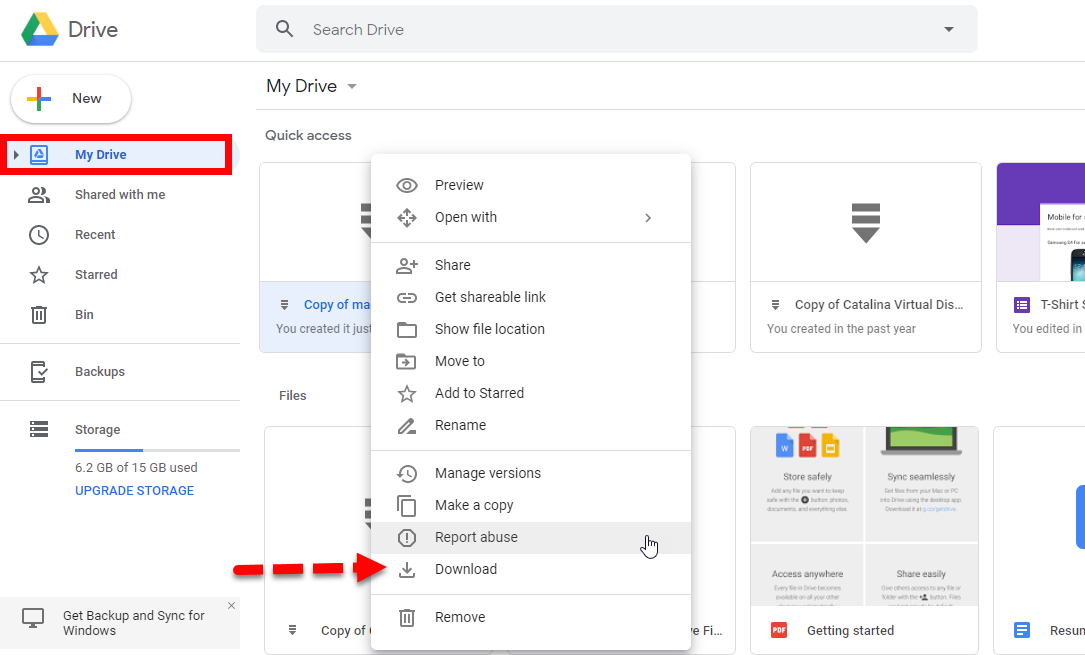 Download the copied file
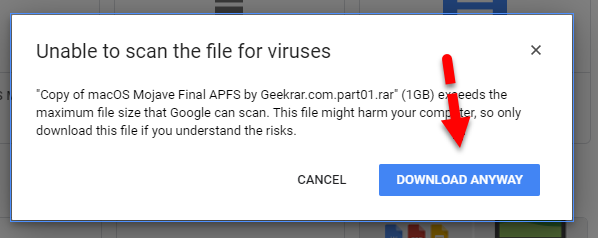
 Step 5. In the last step, when you click on the download option then you will face. And prompt you then don’t worry about that nothing will happen to your computer just click on the Download Anyway.
 Download Anyway
 Conclusion:
That’s each and everything about How to Fix Google Drive Download Limit, Quota Exceeded Error. I hope that you have gotten something about fixing the download limit of Google Drive. If you have a problem or question then feel to write it on the comment. I will find a simple solution to your problem. Don’t forget to give your valuable feedback about this.
Tagged
Share This Article
You might have download the file from Google Drive. If yes then sometimes definitely you will face the error while downloading the file which is Download Quota exceeded for this file, so you can’t download it at this time. So, Google Drive is the platform where you can save and store your files without any problem. And it will give space free up to 15GB. You might know about it because you can upload many files like software, video, and documents and you can share with your family members and friends easily. Therefore, in this article, I am going to guide you How to Fix Google Drive Download Limit, Quota Exceeded Error.
Fix Google Drive Download Limit, Quota Exceeded Error
As I have researched that people are using Google Drive for different purposes and everyone is free to upload, download and share with your friends and family. You can share with a large number of people around the world. If too many people download the file which you have shared then the file will be blocked. When a large number of users views or downloads a file, the file may be locked for a 24 hour period before the quota is reset. So, if the file is popular and important that has high traffic on it, it might take days or more than it to download it again from Google Drive. Therefore, when more users come to that file then Google will give the strike to Google because Google Drive has a download limit. If you cross the limit then you will face such a problem.
Related:
How to Fix Google Drive Download Limit, Quota Exceeded Error
Step 1. You need to create a Gmail account for yourself then login to Google Drive.
Step 2. So, after signing into Google Drive, then you need to go to the Shared Google Drive which you want to download. If it gives error by the name of Download Quota exceeded for this file, so you can’t download it at this time. You have to be signed in in order to copy someones else file to your Google Drive. So, For copying the file you need to right-click on the file. Then you will see the option of Make a Copy click on that in order to have a copy of the file in your own drive.
Make Copy Step 3. When you clicked on the Make a copy then you will see the notification on the left-bottom of the screen your computer. Which has created a copy of the fil in your Drive for that you need to click on the Show File Location or you can directly go to the My drive.
Show File Location Step 4. After that, the file is successfully the copy of the file has created on your Drive. For downloading the copy file you need to right-click on that and click on the download option.
Download the copied file Step 5. In the last step, when you click on the download option then you will face. And prompt you then don’t worry about that nothing will happen to your computer just click on the Download Anyway.
Download Anyway Conclusion:
That’s each and everything about How to Fix Google Drive Download Limit, Quota Exceeded Error. I hope that you have gotten something about fixing the download limit of Google Drive. If you have a problem or question then feel to write it on the comment. I will find a simple solution to your problem. Don’t forget to give your valuable feedback about this.


