

How to Fix .EXE Files Not Opening in Windows 10
 Azaz Shaikh
When you enter the world of Technology and trying different kinds of Technology then you will certainly face hundreds of problems while using them. Every Technology has a unique way in order to use them properly. Nowadays, Technology gadgets perform well and made the work of users easier and more comfortable. You will face too many problems but when you Google it then you can find thousands of solutions for sure. So, solving problems will give you a new experience.
However, Windows 10 is the most popular operating system out there. There are hundreds of software and games in which all of them have exe file in order to run them. Whenever you are going to open any software on your Windows 10 PC, you won’t see anything, and also you won’t get any error to tell you about it. Therefore, I have been through this embarrassing process. For the new users, it is really scary when they try to open any software but it couldn’t.
EXE Files Not Opening In Windows 10
Most of the people think that Exe file is a kind of software on the Windows operating system, it is totally wrong. Actually, there is some software that you download from Google and they might contain virus which can damage the exe file. You have to avoid downloading third-party software from untrusted websites because it won’t be good for you.
Therefore, if you are continuously facing EXE files not opening, it might stop you to work on different projects. You don’t have to worry because I am going to show you the easy and simple method to fix exe files not opening in Windows 10.
We are not going to use any third-party software in order to fix it. However, we have an option for that by the name of the registry. For the purpose of this guide, we will use the Registry method because it will allow us to edit the exe file You have to follow all those steps which I am guiding down below.
How to Fix .EXE Files Not Opening In Windows 10
1. From the first, you have to open the Start Menu and make sure to search for Regedit.
2. When the result appears, click on the Registry Editor.
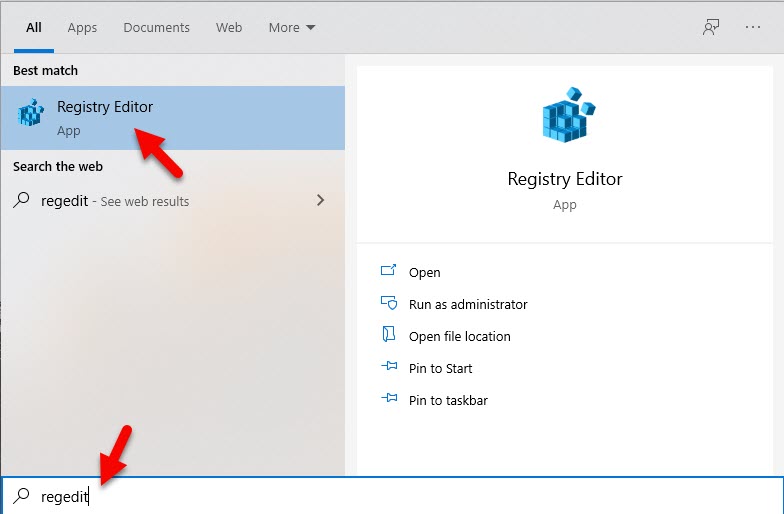 Registry Editor
 3. From the left side, you have to select the HKEY_CLASSES_ROOT option.
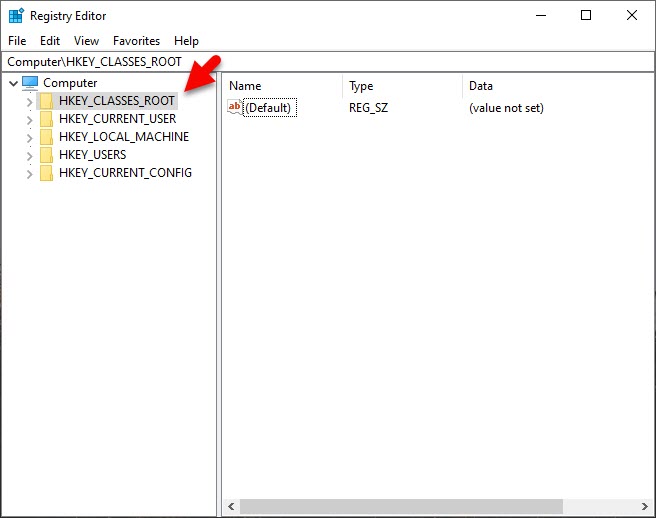 HKEY_CLASSES_ROOT
 4. After that, scroll down and click on the .exe file.
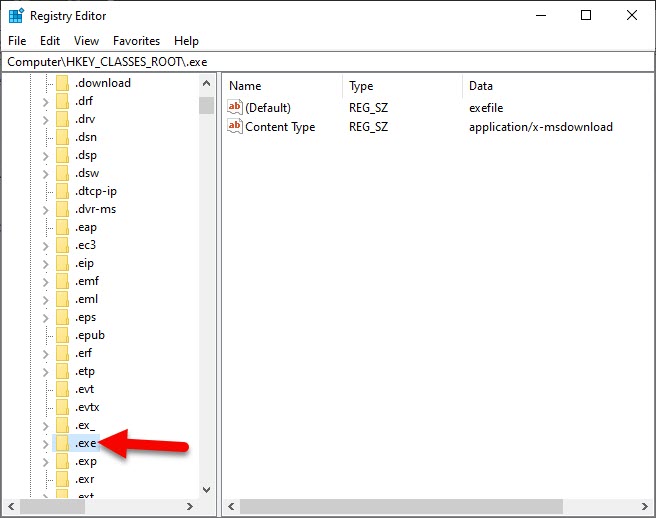 .exe file
 5. On the right side, select the Default option and type the Value Data as exefile.
6. Now, click on the Ok in order to save the changes.
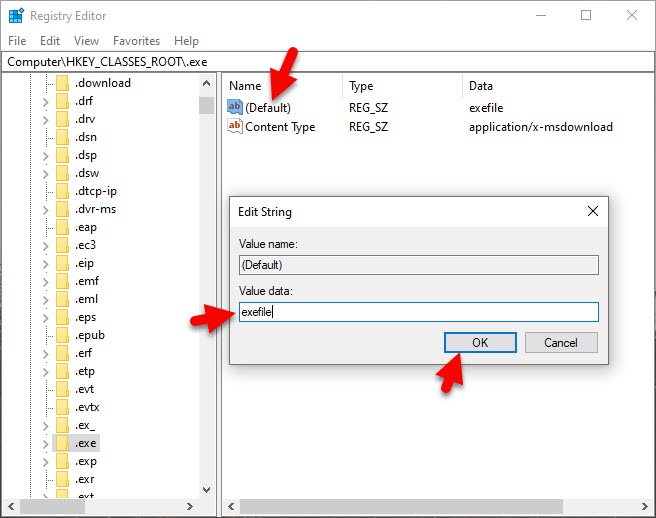 exefile
 7. Again from the left side, you have to select the below registry.
HKEY_CLASSES_ROOT\exefile\shell\open\command
8. Next up, click on the Command.
9. Then, click on the Default and set the Value Data as “%1” %* .
10. Once everything is done, click on the Ok to save the changes.
11. You have done each and everything then make sure to restart your Windows computer.
Related Guides:
- How to Turn Off or Disable Bluetooth on Windows 10
- How to Remove Microsoft Account in Windows 10
- change the IP address in Windows 10
Bottom Line
It was the complete guide on How to Fix .EXE Files Not Opening in Windows 10. I hope you have found this article helpful. If you have any problem or question then don’t hesitate to leave comments in the comment section down below.
Tagged
Share This Article
When you enter the world of Technology and trying different kinds of Technology then you will certainly face hundreds of problems while using them. Every Technology has a unique way in order to use them properly. Nowadays, Technology gadgets perform well and made the work of users easier and more comfortable. You will face too many problems but when you Google it then you can find thousands of solutions for sure. So, solving problems will give you a new experience.
However, Windows 10 is the most popular operating system out there. There are hundreds of software and games in which all of them have exe file in order to run them. Whenever you are going to open any software on your Windows 10 PC, you won’t see anything, and also you won’t get any error to tell you about it. Therefore, I have been through this embarrassing process. For the new users, it is really scary when they try to open any software but it couldn’t.
EXE Files Not Opening In Windows 10
Most of the people think that Exe file is a kind of software on the Windows operating system, it is totally wrong. Actually, there is some software that you download from Google and they might contain virus which can damage the exe file. You have to avoid downloading third-party software from untrusted websites because it won’t be good for you.
Therefore, if you are continuously facing EXE files not opening, it might stop you to work on different projects. You don’t have to worry because I am going to show you the easy and simple method to fix exe files not opening in Windows 10.
We are not going to use any third-party software in order to fix it. However, we have an option for that by the name of the registry. For the purpose of this guide, we will use the Registry method because it will allow us to edit the exe file You have to follow all those steps which I am guiding down below.
How to Fix .EXE Files Not Opening In Windows 10
1. From the first, you have to open the Start Menu and make sure to search for Regedit.
2. When the result appears, click on the Registry Editor.
Registry Editor 3. From the left side, you have to select the HKEY_CLASSES_ROOT option.
HKEY_CLASSES_ROOT 4. After that, scroll down and click on the .exe file.
.exe file 5. On the right side, select the Default option and type the Value Data as exefile.
6. Now, click on the Ok in order to save the changes.
exefile 7. Again from the left side, you have to select the below registry.
HKEY_CLASSES_ROOT\exefile\shell\open\command
8. Next up, click on the Command.
9. Then, click on the Default and set the Value Data as “%1” %* .
10. Once everything is done, click on the Ok to save the changes.
11. You have done each and everything then make sure to restart your Windows computer.
Related Guides:
- How to Turn Off or Disable Bluetooth on Windows 10
- How to Remove Microsoft Account in Windows 10
- change the IP address in Windows 10
Bottom Line
It was the complete guide on How to Fix .EXE Files Not Opening in Windows 10. I hope you have found this article helpful. If you have any problem or question then don’t hesitate to leave comments in the comment section down below.


