

How to Check AirPods Pro Serial Number | 3 Easy Methods
 Azaz Shaikh
In this article, I am going to show you How to Check AirPods Pro Serial Number | 3 Easy Methods. If you want to check and find your AirPod’s serial number then here you will find 3 methods. As my idea, the serial number of every Apple product like Apple Watch, iPhone, and AirPods is very important as you need the serial number in order to check the coverage of any Apple product. In this case, Apple AirPods serial number is required when you want to replace or change the broken AirPods. According to the news, Apple company has removed the serial number from the backside of its devices such as iPhone and Apple Watches.
Before Apple company was printing and adding the serial number on the back of the iPhone and Apple watches. But, nowadays you will not find and check the serial number on the backside of its product. In this case, Apple AirPods serial number is displayed and printed on the case of AirPods Pro. Therefore, if the serial number is too small to read or has worn off, we will cover a couple of different ways to find your serial number. Or sometimes it may be removed by accident and if you lose the case of your AirPods Pro then the below method will be very helpful for you.
If you search on the Internet, you will come across several methods to find the serial number of Apple AirPods Pro, but some of the methods are confusing and don’t work. In this section, I will discuss three easy ways to get the serial number of any AirPods Pro. Therefore, I am going to show and guide you with the three ways in order to find and check the serial number of your AirPods Pro.
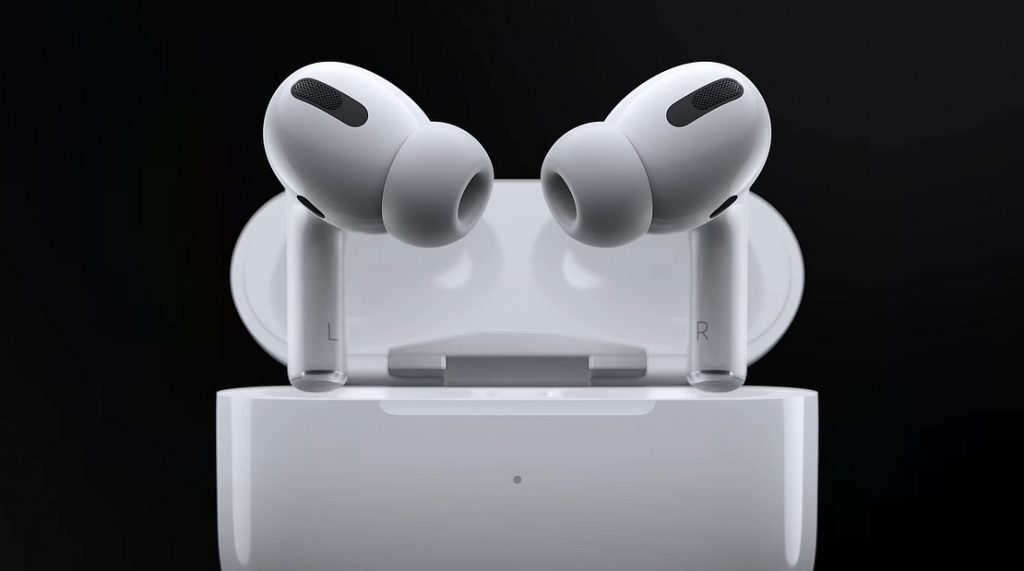 How to Check AirPods Pro Serial Number
1. Check AirPods Pro Serial Number with your iPhone
Step 1. First of all, you have to connect your AirPod Pro with your iPhone.
Step 2. When the AirPod successfully connected with your iPhone, now you need to go and open the Setting of your iPhone. Then scroll down on the setting and you need to tap on the General option.
Step 3. In the general section, you have to tap on the About. Then you have to tap on the AirPods Pro option.
Step 4. Then, a new window will appear where all the information will be there included the serial number.
With the serial number, you can see and know more about your AirPod like model number, hardware version, firmware version, and manufacturer.
Now, if you still didn’t check the serial number even after this method. In this case, don’t worry you have to check two methods below.
2. Check and Find AirPods Pro’s Serial Number from the Packing Box
In the 2nd method, if you haven’t lost the packing box of your AirPods Pro then you have to go and find out the packing box of your AirPods Pro. On the packing box apple company has displayed the serial number of AirPods Pro. In this case, you need to cautious and note down the serial number which will be definitely printed on the packing box.
Most of the people throw the packing box of their AirPods Pro away after using and taking the gadgets because they think that the packing box is useless. So, if you take care and don’t throw the AirPods Pro packing box. Then you will not face a single problem regarding your AirPods Pro serial number.
3. Check AirPods Pro Serial Number from the Original Invoice
Now, the easiest way to check the AirPods Pro Serial Number that you can check it from the Original Invoice. The original bill will also be very beneficial for you in case the AirPods gets broken or damaged. However, don’t waste your time too much. You have to go and find out the original bill of your AirPods Pro. Then you may note down on a piece of paper so that you can get the serial number of your AirPods Pro whenever you require it in the future.
You may want the related article:
Final Thoughts
That’s all about How to Check AirPods Pro Serial Number | 3 Easy Methods. I hope you found these tips and trick beneficial for checking the AirPods Pro serial number. These three methods are the simplest and finest method that allows you in order to check your AirPods Pro serial number. In this case, if you faced any kind of problem or any question regarding this then please let me know by commenting below. Don’t forget to give feedback and suggestion.
Share This Article
In this article, I am going to show you How to Check AirPods Pro Serial Number | 3 Easy Methods. If you want to check and find your AirPod’s serial number then here you will find 3 methods. As my idea, the serial number of every Apple product like Apple Watch, iPhone, and AirPods is very important as you need the serial number in order to check the coverage of any Apple product. In this case, Apple AirPods serial number is required when you want to replace or change the broken AirPods. According to the news, Apple company has removed the serial number from the backside of its devices such as iPhone and Apple Watches.
Before Apple company was printing and adding the serial number on the back of the iPhone and Apple watches. But, nowadays you will not find and check the serial number on the backside of its product. In this case, Apple AirPods serial number is displayed and printed on the case of AirPods Pro. Therefore, if the serial number is too small to read or has worn off, we will cover a couple of different ways to find your serial number. Or sometimes it may be removed by accident and if you lose the case of your AirPods Pro then the below method will be very helpful for you.
If you search on the Internet, you will come across several methods to find the serial number of Apple AirPods Pro, but some of the methods are confusing and don’t work. In this section, I will discuss three easy ways to get the serial number of any AirPods Pro. Therefore, I am going to show and guide you with the three ways in order to find and check the serial number of your AirPods Pro.
How to Check AirPods Pro Serial Number
1. Check AirPods Pro Serial Number with your iPhone
Step 1. First of all, you have to connect your AirPod Pro with your iPhone.
Step 2. When the AirPod successfully connected with your iPhone, now you need to go and open the Setting of your iPhone. Then scroll down on the setting and you need to tap on the General option.
Step 3. In the general section, you have to tap on the About. Then you have to tap on the AirPods Pro option.
Step 4. Then, a new window will appear where all the information will be there included the serial number.
With the serial number, you can see and know more about your AirPod like model number, hardware version, firmware version, and manufacturer.
Now, if you still didn’t check the serial number even after this method. In this case, don’t worry you have to check two methods below.
2. Check and Find AirPods Pro’s Serial Number from the Packing Box
In the 2nd method, if you haven’t lost the packing box of your AirPods Pro then you have to go and find out the packing box of your AirPods Pro. On the packing box apple company has displayed the serial number of AirPods Pro. In this case, you need to cautious and note down the serial number which will be definitely printed on the packing box.
Most of the people throw the packing box of their AirPods Pro away after using and taking the gadgets because they think that the packing box is useless. So, if you take care and don’t throw the AirPods Pro packing box. Then you will not face a single problem regarding your AirPods Pro serial number.
3. Check AirPods Pro Serial Number from the Original Invoice
Now, the easiest way to check the AirPods Pro Serial Number that you can check it from the Original Invoice. The original bill will also be very beneficial for you in case the AirPods gets broken or damaged. However, don’t waste your time too much. You have to go and find out the original bill of your AirPods Pro. Then you may note down on a piece of paper so that you can get the serial number of your AirPods Pro whenever you require it in the future.
You may want the related article:
Final Thoughts
That’s all about How to Check AirPods Pro Serial Number | 3 Easy Methods. I hope you found these tips and trick beneficial for checking the AirPods Pro serial number. These three methods are the simplest and finest method that allows you in order to check your AirPods Pro serial number. In this case, if you faced any kind of problem or any question regarding this then please let me know by commenting below. Don’t forget to give feedback and suggestion.


