

How to Change Video Thumbnail on Facebook – Custom Thumbnail 2022
 Azaz Shaikh
In this article, I am going to guide to that How to Change Video Thumbnail on Facebook – Custom Thumbnail 2020. Most of the people don’t know how to change the thumbnail on Facebook. If you are among them then not to worry. I am going to guide. Believe me that it will make the video more attractive for everyone to watch it. 40% of people who are video marketer in Facebook they don’t how to change the thumbnail and if you want to attract the people to your video to get more views then this article for you. fully concentrate the step that I will share with you guys and just follow them below to set your own thumbnail on your videos. If you want to download Facebook video thumbnail then you can follow the pinned post
Download Facebook Video Thumbnail
How to Change Video Thumbnail on Facebook – Custom Thumbnail
I am pretty sure that it will work to you as well to attract the people to your video. So, here are some easy steps to Change Video Thumbnail on Facebook.
Step 1. First of all login into your facebook account.
Step 2. After that, go to the facebook page or group which you are going to upload your video with your own thumbnail.
 Facebook page or group
 Step 3. Then on the right side below the logo of the page, you will see the menu bar like, Home, Posts, Jobs, Event, Reviews, Videos and you are going click on the Videos because we are going to upload videos with yo4ur own thumbnail.
 Videos
 Step 4. Now it is time to choose the video, You have to click on the +Add video button then choose the video which you want to add your own thumbnail.
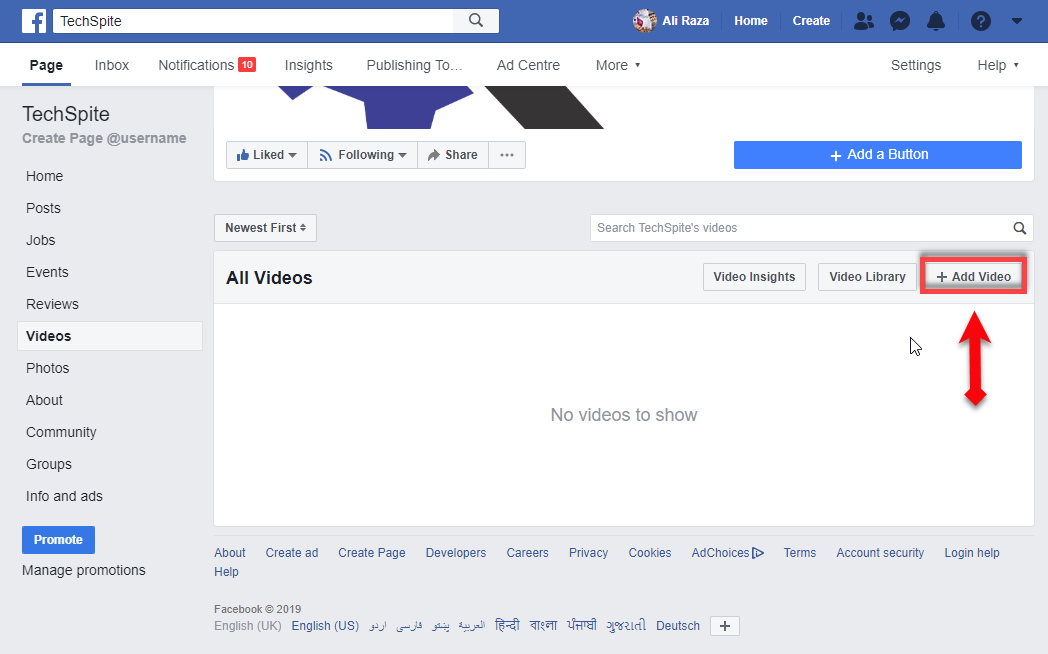 +add video
 Step 5. In this step, so a new window will be open first of all, write the video description, write the tag of video so people should find you easily and on the right side you will see thumbnail click on that then a new window will be open then click on the add image, so choose the thumbnail which you want to set as thumbnail.
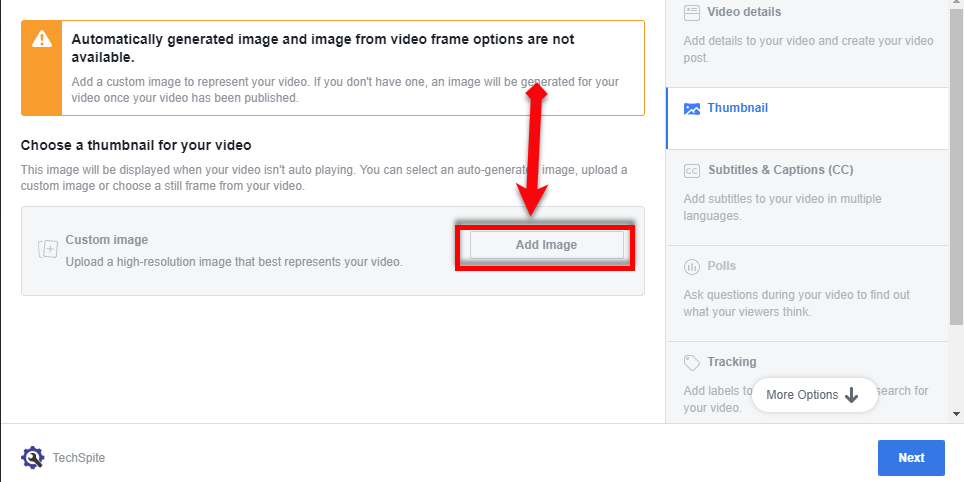 custom thumbnail
 Conclusion:
Therefore, It was step by step guide on How to Change Video Thumbnail on Facebook – Custom Thumbnail 2020. hope so that it was a great and useful article for you. So, if you have any question about this then feel free to ask with the comment box. Daily visit our site for the best tech learning point. Thanks for visiting techspite.com
Share This Article
In this article, I am going to guide to that How to Change Video Thumbnail on Facebook – Custom Thumbnail 2020. Most of the people don’t know how to change the thumbnail on Facebook. If you are among them then not to worry. I am going to guide. Believe me that it will make the video more attractive for everyone to watch it. 40% of people who are video marketer in Facebook they don’t how to change the thumbnail and if you want to attract the people to your video to get more views then this article for you. fully concentrate the step that I will share with you guys and just follow them below to set your own thumbnail on your videos. If you want to download Facebook video thumbnail then you can follow the pinned post
Download Facebook Video Thumbnail
How to Change Video Thumbnail on Facebook – Custom Thumbnail
I am pretty sure that it will work to you as well to attract the people to your video. So, here are some easy steps to Change Video Thumbnail on Facebook.
Step 1. First of all login into your facebook account.
Step 2. After that, go to the facebook page or group which you are going to upload your video with your own thumbnail.
Facebook page or group Step 3. Then on the right side below the logo of the page, you will see the menu bar like, Home, Posts, Jobs, Event, Reviews, Videos and you are going click on the Videos because we are going to upload videos with yo4ur own thumbnail.
Videos Step 4. Now it is time to choose the video, You have to click on the +Add video button then choose the video which you want to add your own thumbnail.
+add video Step 5. In this step, so a new window will be open first of all, write the video description, write the tag of video so people should find you easily and on the right side you will see thumbnail click on that then a new window will be open then click on the add image, so choose the thumbnail which you want to set as thumbnail.
custom thumbnail Conclusion:
Therefore, It was step by step guide on How to Change Video Thumbnail on Facebook – Custom Thumbnail 2020. hope so that it was a great and useful article for you. So, if you have any question about this then feel free to ask with the comment box. Daily visit our site for the best tech learning point. Thanks for visiting techspite.com


