

How to Add Sticky Ads on WordPress Sites to Boost Revenue
 Azaz Shaikh
When working online, everyone wants to have more and more revenue or earnings from Google AdSense. In this case, every person is using their own tricks to increase or boost AdSense revenue. For example, adding popup or sticks ads on blog, choosing high paying niche, selecting good CPC keywords, and some more basic techniques. If you are working online, you might know that Google AdSense is the biggest ad network company that serves ads on different websites. Nowadays, those who are having blog websites are really working hard to increase their revenue from Google AdSense.
If you want to increase revenue on Blogger or WordPress website then you have to research and find out the high CPC topics from Google Adword planner. Every blogger is searching too much on how to increase AdSense revenue as I always do. I have been searching the methods for many days, finally, I found a better solution which helped me in increasing AdSense revenue. Therefore, I would like to show the method down below which will definitely increase or boost your Google AdSense revenue.
It might be difficult to find out the high CPC keywords or titles, in this case, it is better to do an easy task to get much revenue from AdSense. Placing ads on sidebars, and not getting revenue from that is totally a waste of time. If you add sticky floating ads on your websites can boost your revenue and also it is free to place then why you don’t try once.
What are Sticky Ads?
Sticky ads are a kind of ads from Google AdSense which is shown in a fixed place and size. It has one advantage that when you even scroll down or up then the sticks ads will not move, it will stay at the same selected place. It is also good to attract visitors, and sticky ads are having more chances to get clicked by someone. And, some of the bloggers are using sticky floating ads on the sidebar for sponsored posts, subscriptions, even AdSense ads, and for many more purposes.
How to Add Sticky Ads on WordPress Sites
Placing sticky ads on your websites is quite easy but it has many advantages. Due to that, you will let you know about its method, you may follow the steps down below and be aware of its all tips and tricks.
This method doesn’t need to edit something on your website, just with the help of a plugin you can effortlessly add it to your site. Go through the instruction now.
Step 1. Search on your website on Google, access to the dashboard of your website. From the left side, you may click on the Plugins and click on Add New. It is the place where you can install plugins for your website.
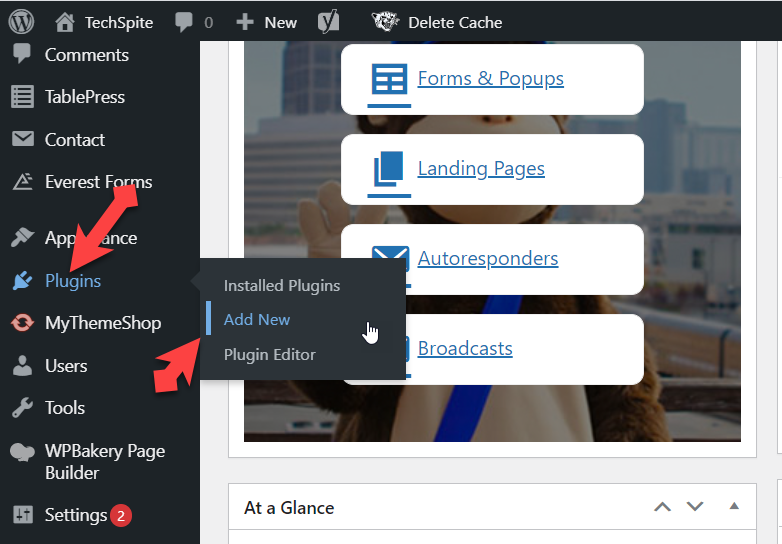 Add new plugin
 Step 2. You will have a search bar on that window. You have to type Floating Ads Bottom.
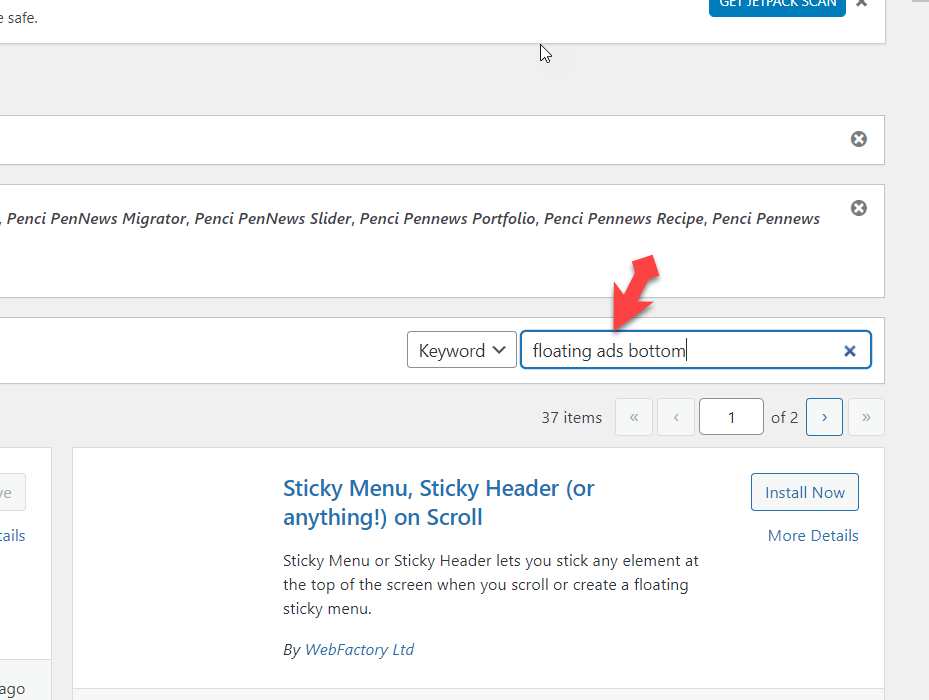 Floating ads bottom
 Step 3. Scroll down and find out the Floating ads bottom plugin exactly which is shown on the screenshot down below. And click Install.
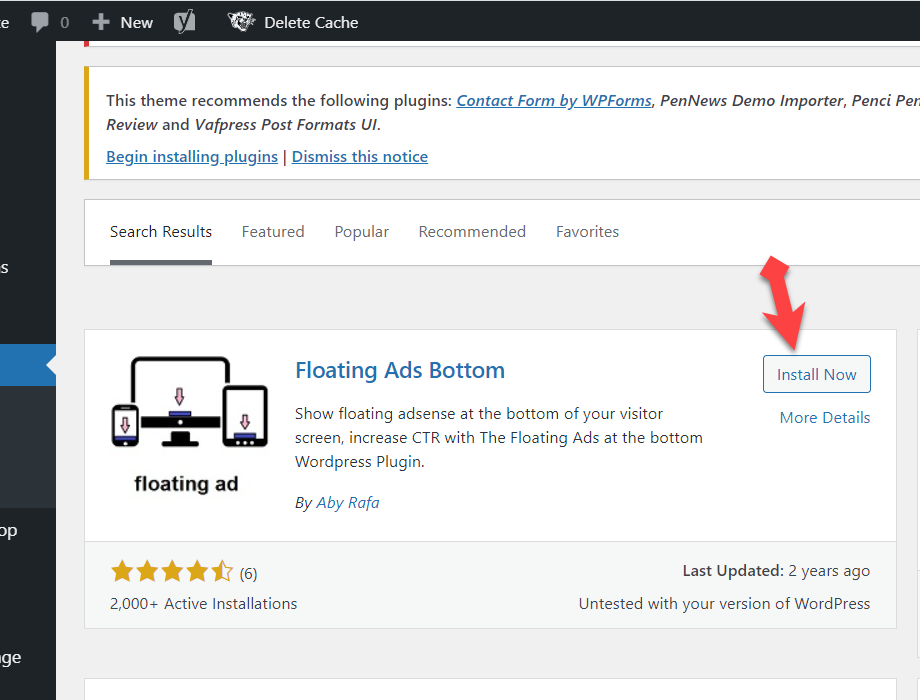 Install now
 Step 4. When the plugin gets installed, simply click on Activate.
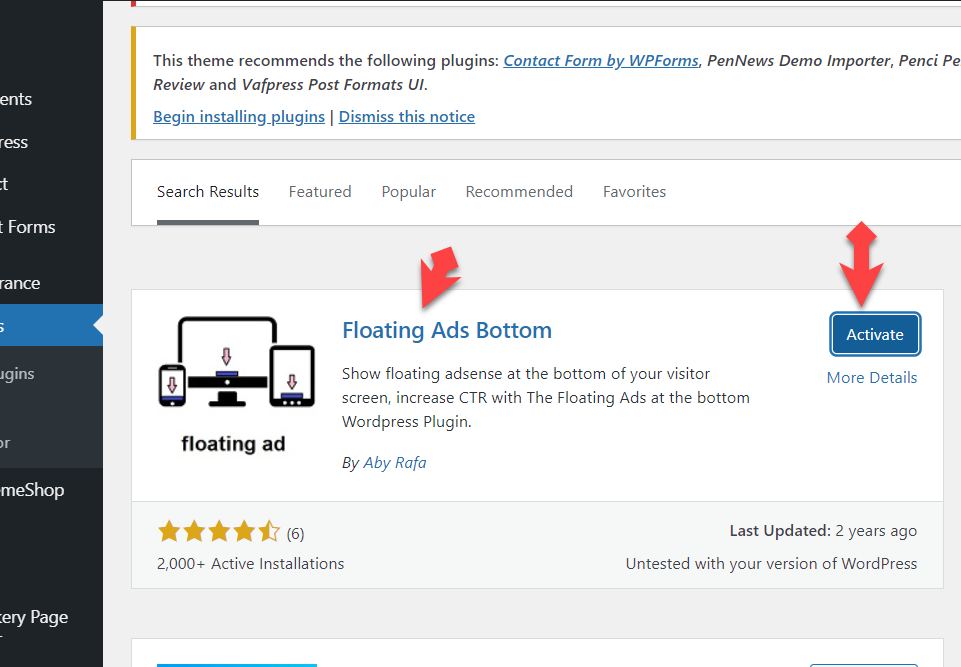 Activate
 Step 5. Once it is successfully activated, from the left side click on Settings, and select the recently installed plugin which is Floating Ads Bottom.
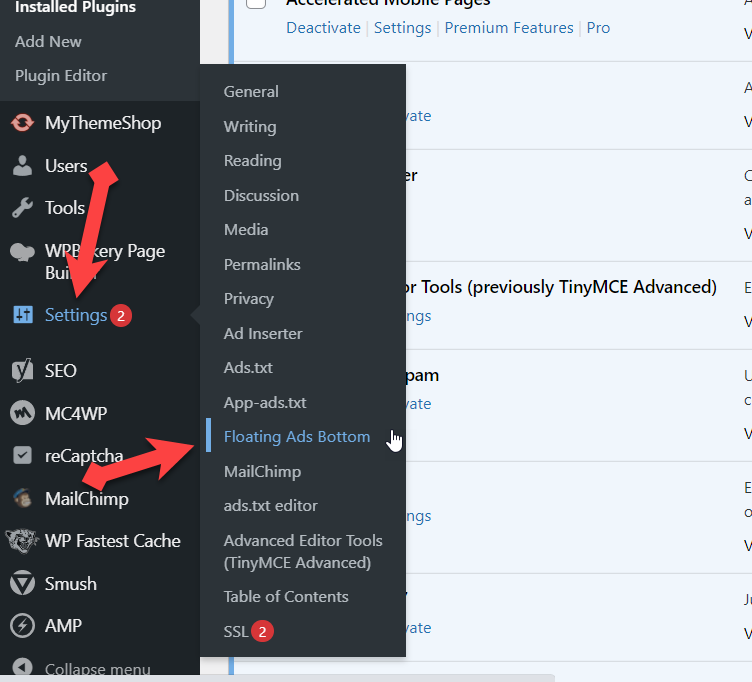 Settings
 Step 6. Now open a new tab, sign in to your Google AdSense account. From the left side, click on Ads, select the By ad unit option and click on Display ad.
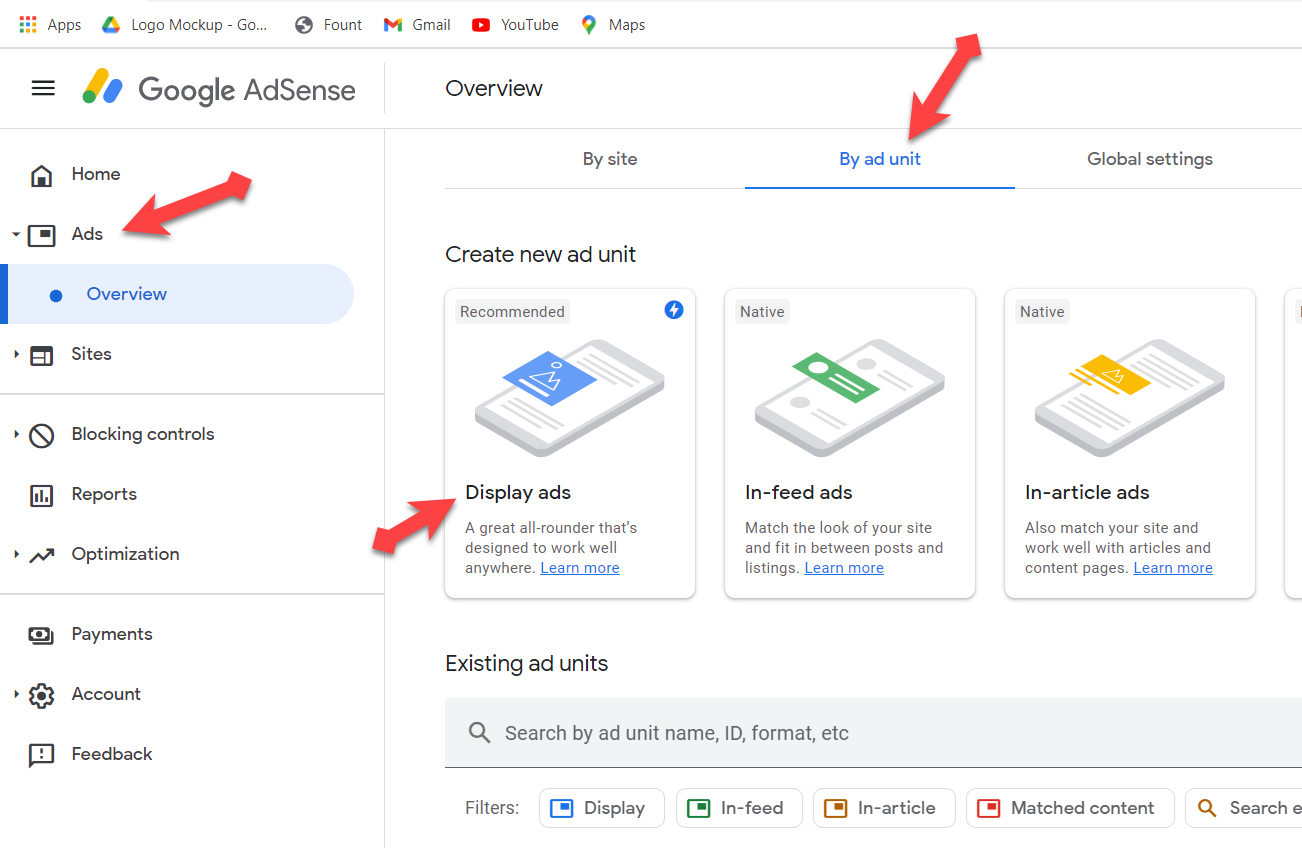 Display ads
 Step 7. Simply type down any name for your ad, and select the fixed size for your ad. Then click on Create.
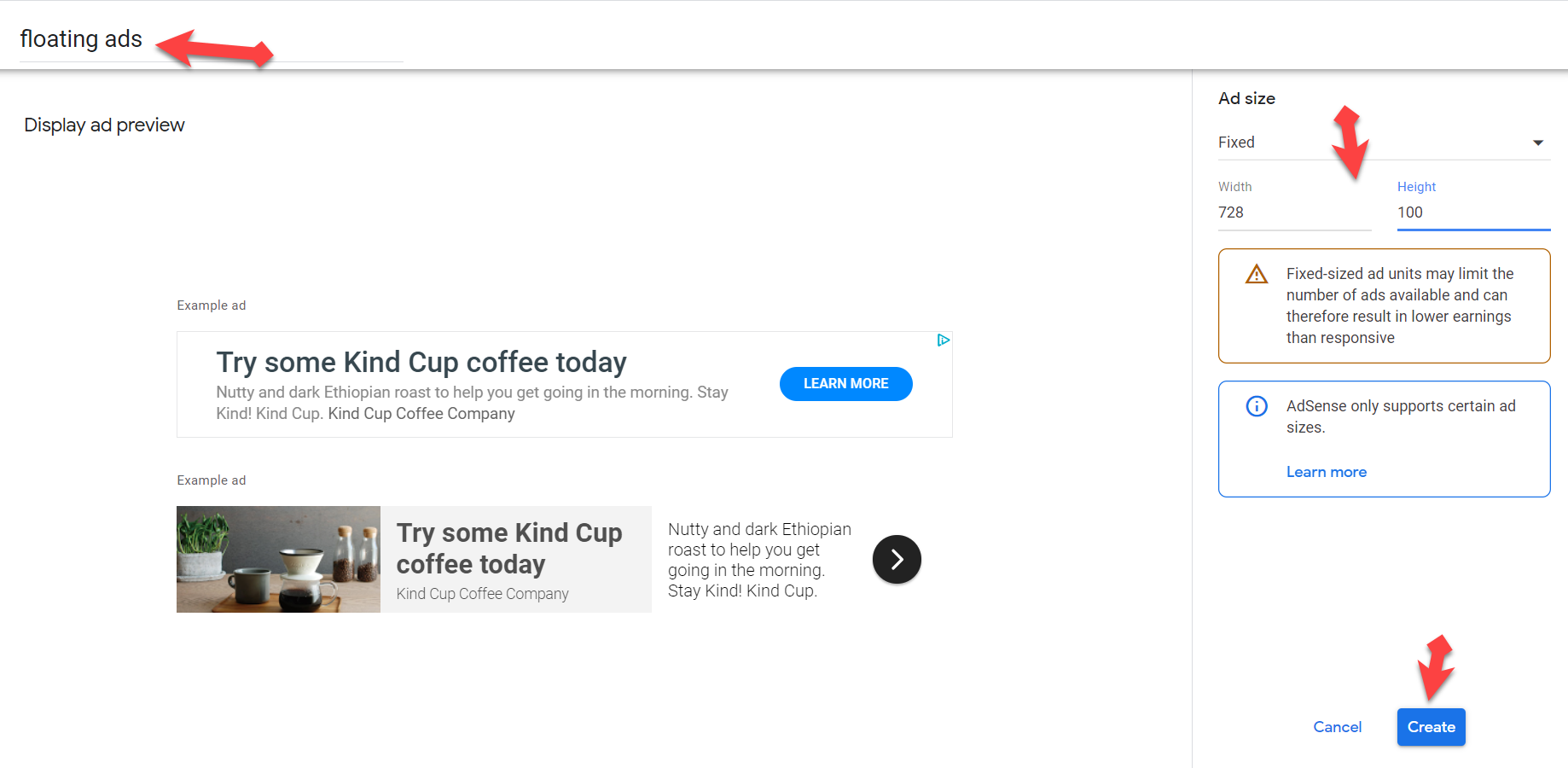 Create ads
 Step 8. They will provide some codes, just copy it.
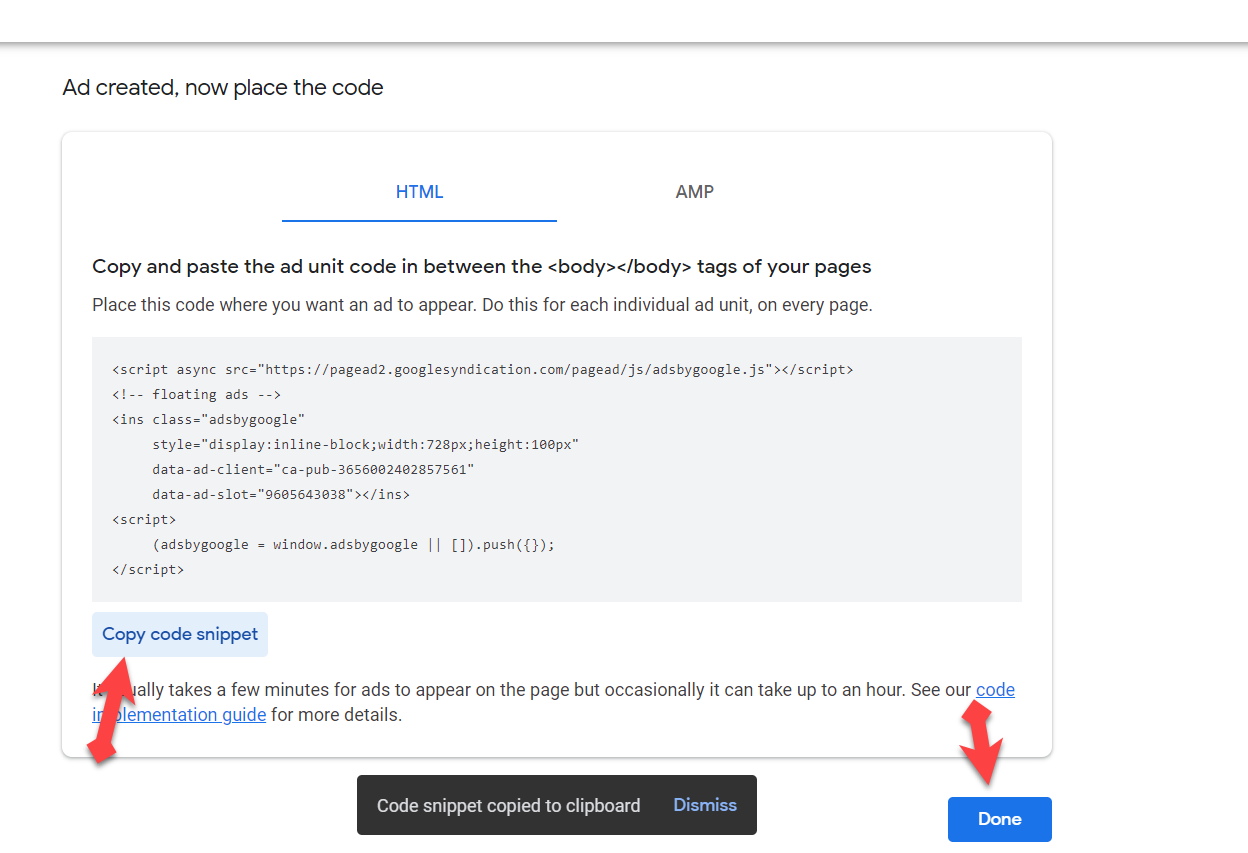 Copy code
 Step 9. Then, again go to your Floating Ads Bottom plugin and paste the copied codes there. And don’t forget to enable AdSense Visibility options and also select Enable. At last click on Save changes.
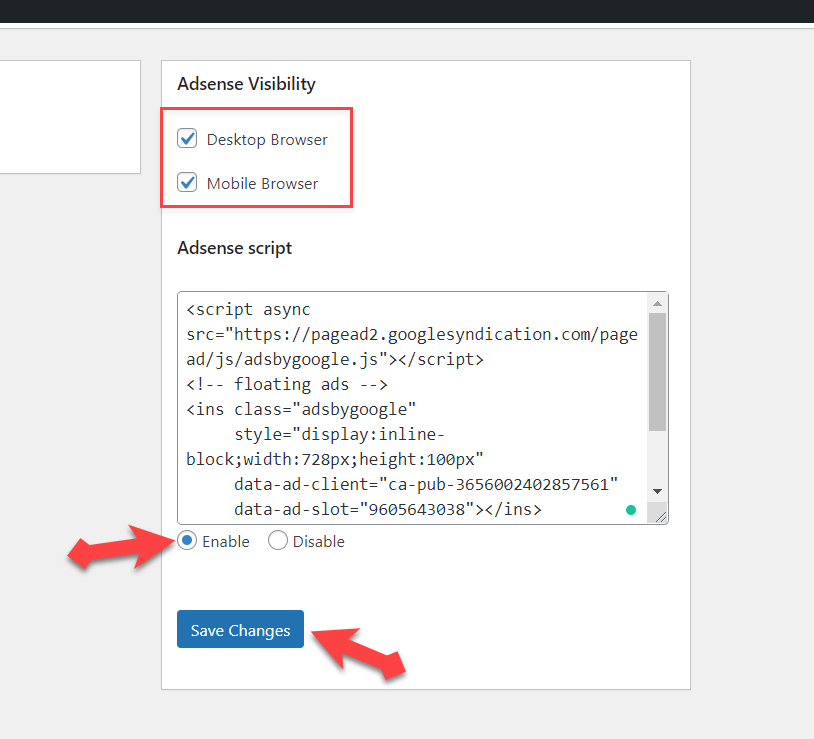 Save changes
 Step 10. Now, visit your website and once refresh that, enjoy using sticky ads on your website.
 Save changes
 Read some more:
- 5 Best AdSense Alternatives to Consider for Your Websites in 2021
- How to Link Google AdSense to Payoneer Account
Bottom line
It was the trick on How to Add Sticky Ads on WordPress Sites to Boost Revenue. The process is not much difficult but really useful to boost or increase the revenue of a Google AdSense. We really appreciate your views about this guide!
If you are having any problem related to anything, comment down below then we will try our best to write step by step guide!
Tagged
Share This Article
When working online, everyone wants to have more and more revenue or earnings from Google AdSense. In this case, every person is using their own tricks to increase or boost AdSense revenue. For example, adding popup or sticks ads on blog, choosing high paying niche, selecting good CPC keywords, and some more basic techniques. If you are working online, you might know that Google AdSense is the biggest ad network company that serves ads on different websites. Nowadays, those who are having blog websites are really working hard to increase their revenue from Google AdSense.
If you want to increase revenue on Blogger or WordPress website then you have to research and find out the high CPC topics from Google Adword planner. Every blogger is searching too much on how to increase AdSense revenue as I always do. I have been searching the methods for many days, finally, I found a better solution which helped me in increasing AdSense revenue. Therefore, I would like to show the method down below which will definitely increase or boost your Google AdSense revenue.
It might be difficult to find out the high CPC keywords or titles, in this case, it is better to do an easy task to get much revenue from AdSense. Placing ads on sidebars, and not getting revenue from that is totally a waste of time. If you add sticky floating ads on your websites can boost your revenue and also it is free to place then why you don’t try once.
What are Sticky Ads?
Sticky ads are a kind of ads from Google AdSense which is shown in a fixed place and size. It has one advantage that when you even scroll down or up then the sticks ads will not move, it will stay at the same selected place. It is also good to attract visitors, and sticky ads are having more chances to get clicked by someone. And, some of the bloggers are using sticky floating ads on the sidebar for sponsored posts, subscriptions, even AdSense ads, and for many more purposes.
How to Add Sticky Ads on WordPress Sites
Placing sticky ads on your websites is quite easy but it has many advantages. Due to that, you will let you know about its method, you may follow the steps down below and be aware of its all tips and tricks.
This method doesn’t need to edit something on your website, just with the help of a plugin you can effortlessly add it to your site. Go through the instruction now.
Step 1. Search on your website on Google, access to the dashboard of your website. From the left side, you may click on the Plugins and click on Add New. It is the place where you can install plugins for your website.
Add new plugin Step 2. You will have a search bar on that window. You have to type Floating Ads Bottom.
Floating ads bottom Step 3. Scroll down and find out the Floating ads bottom plugin exactly which is shown on the screenshot down below. And click Install.
Install now Step 4. When the plugin gets installed, simply click on Activate.
Activate Step 5. Once it is successfully activated, from the left side click on Settings, and select the recently installed plugin which is Floating Ads Bottom.
Settings Step 6. Now open a new tab, sign in to your Google AdSense account. From the left side, click on Ads, select the By ad unit option and click on Display ad.
Display ads Step 7. Simply type down any name for your ad, and select the fixed size for your ad. Then click on Create.
Create ads Step 8. They will provide some codes, just copy it.
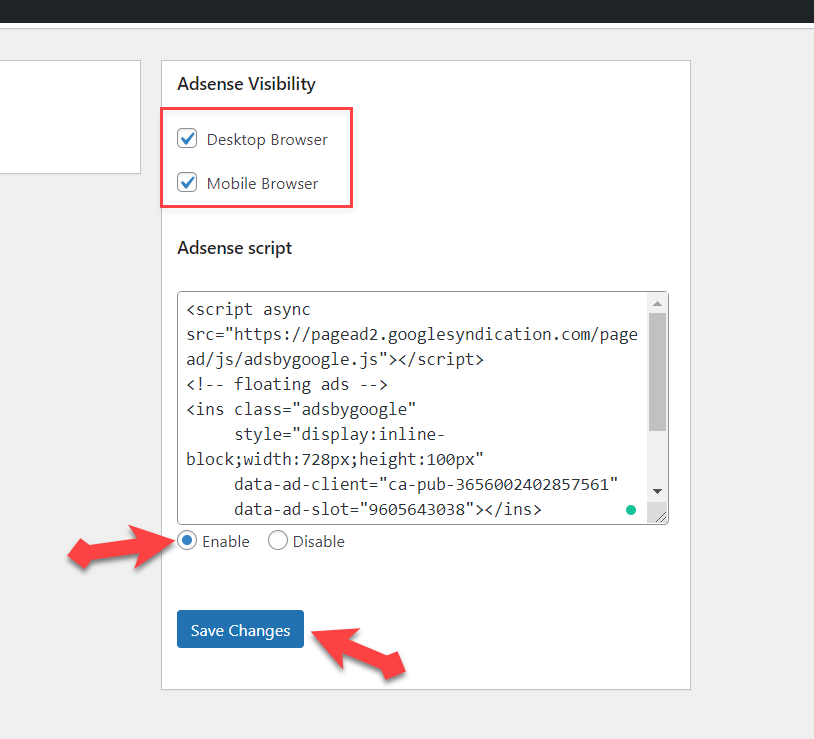
Copy code Step 9. Then, again go to your Floating Ads Bottom plugin and paste the copied codes there. And don’t forget to enable AdSense Visibility options and also select Enable. At last click on Save changes.
Save changes Step 10. Now, visit your website and once refresh that, enjoy using sticky ads on your website.
Save changes Read some more:
- 5 Best AdSense Alternatives to Consider for Your Websites in 2021
- How to Link Google AdSense to Payoneer Account
Bottom line
It was the trick on How to Add Sticky Ads on WordPress Sites to Boost Revenue. The process is not much difficult but really useful to boost or increase the revenue of a Google AdSense. We really appreciate your views about this guide!
If you are having any problem related to anything, comment down below then we will try our best to write step by step guide!


