

How to Activate Windows 11 Without Product Key For Free?
 Azaz Shaikh
When you install Windows 11 on your PC then you will use that. Most of the people want to install the new operating system. During using Windows 11 then it wants to activate the Windows 11. Once your PC is not activated then you can not use some features of Windows 11. However, when you want to activate your PC then you try after that you don’t know the step then you can activate it. Moreover, once you don’t know the step then you will search on YouTube after that the video your watching maybe it is not real. But don’t worry I am here to solve your problem. This is the right place to solve your problem. If you want to activate Windows 11 without a product key then you need to read this article. So, without wasting any time let’s get has started. From this article, you will learn How to Activate Windows 11 Without Product Key For Free?
Related Post: How to Install VirtualBox on Windows 11
How to Activate Windows 11 Without Product Key For Free
To activate Windows 11 you need to download two files. With these two files, you can not activate your Windows 11. Both file links are given to you down below.
Download KMSAuto Activator
Download Microsoft ToolKit
Step 1. When you install that then you will see that says You Need To Activate Windows Before You Can Personalize Your PC.
Step 2. Now, you need to download the KMSAuto from the above link after that open the WinRAR then double click on the KMSAuto file.
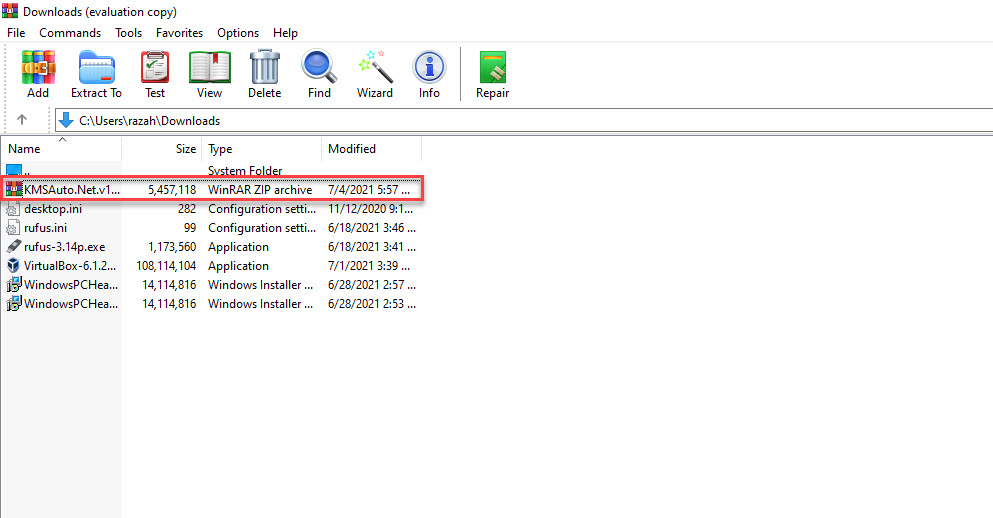 Double Click
 Step 3. Click on the Activation at the top.
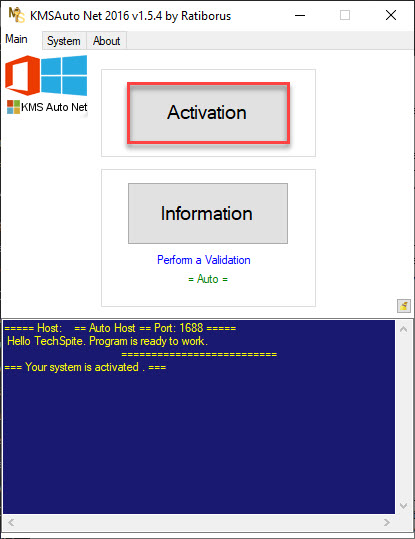 Click on the Activation
 Step 4. Next, simply tap on the Activate Windows.
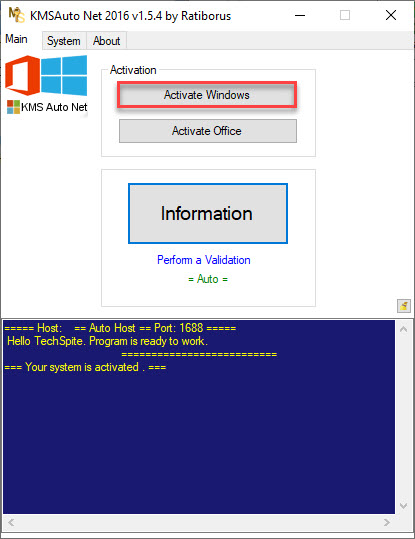 Tap on the Activate Windows
 Step 5. Wait till that then it will automatically find the product key.
Step 6. Once it gives you the product the key after that click on the Continue.
Method 2: Activate Windows 11 Without Product Key For Free
If the above method is not working then it will work. To activate that you need to follow the step down below.
Step 1. Download the second file that is given to you above. When you install it on your PC then launch it after that click on the Windows icon at the bottom of your screen.
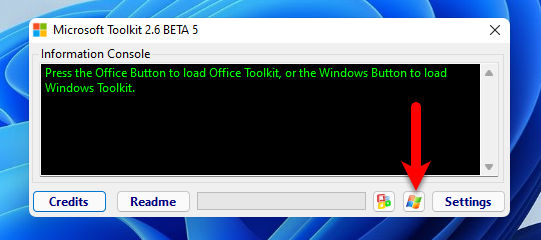 Click on the Windows icon
 Step 2. However, when you click on the windows icon after that click on the EZ-Activator.
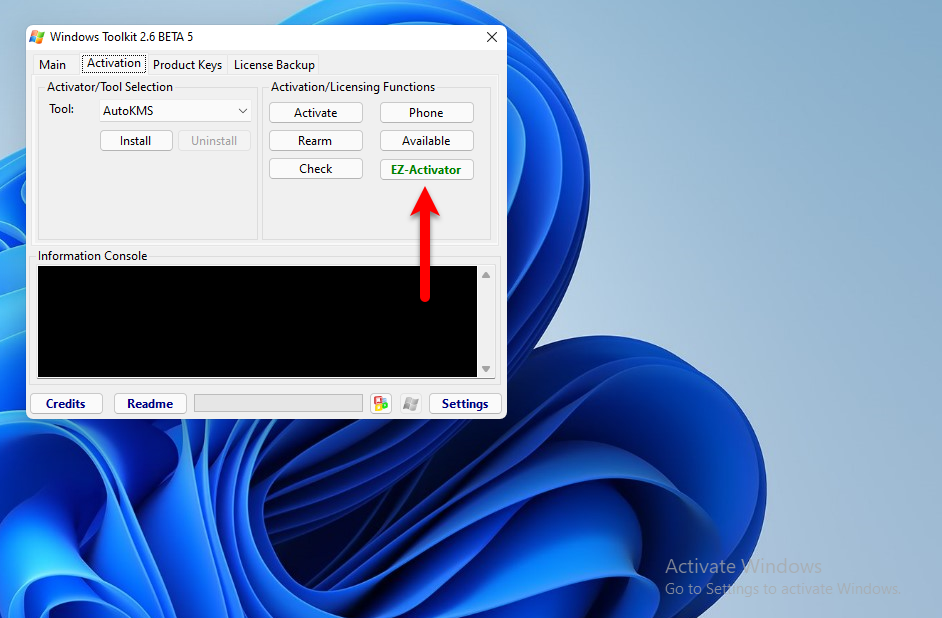 Click on the EZ-Activator
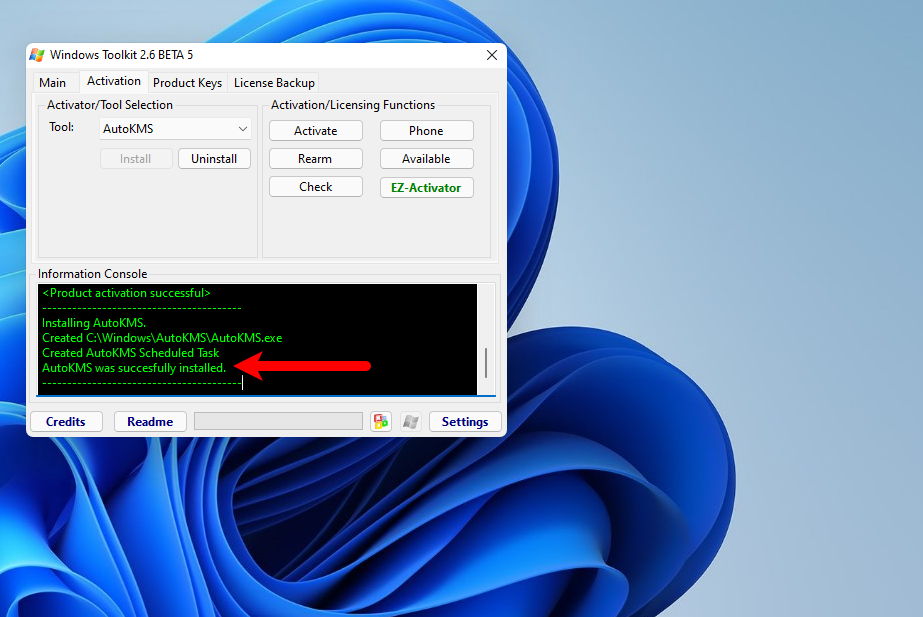
 Step 3. Now, wait till the process is not done then the watermark of activation of windows 11 will disappear.
Related Post: How to Fix This PC Can’t Run Windows 11
Bottom Line
It was all about How to Activate Windows 11 Without Product Key For Free? I hope this article is very helpful for you to activate your Windows 11 PC. From this article, you will get something good. This is the place where you can solve your problem very easily. After following these steps I hope you will not face any kind of problem. If you faced any kind of problem and if you have any type of suggestions then do comment.
Related Post: Download macOS Monterey VMware and VirtualBox Image
Share This Article
When you install Windows 11 on your PC then you will use that. Most of the people want to install the new operating system. During using Windows 11 then it wants to activate the Windows 11. Once your PC is not activated then you can not use some features of Windows 11. However, when you want to activate your PC then you try after that you don’t know the step then you can activate it. Moreover, once you don’t know the step then you will search on YouTube after that the video your watching maybe it is not real. But don’t worry I am here to solve your problem. This is the right place to solve your problem. If you want to activate Windows 11 without a product key then you need to read this article. So, without wasting any time let’s get has started. From this article, you will learn How to Activate Windows 11 Without Product Key For Free?
Related Post: How to Install VirtualBox on Windows 11
How to Activate Windows 11 Without Product Key For Free
To activate Windows 11 you need to download two files. With these two files, you can not activate your Windows 11. Both file links are given to you down below.
Download KMSAuto Activator
Download Microsoft ToolKit
Step 1. When you install that then you will see that says You Need To Activate Windows Before You Can Personalize Your PC.
Step 2. Now, you need to download the KMSAuto from the above link after that open the WinRAR then double click on the KMSAuto file.
Double Click Step 3. Click on the Activation at the top.
Click on the Activation Step 4. Next, simply tap on the Activate Windows.
Tap on the Activate Windows Step 5. Wait till that then it will automatically find the product key.
Step 6. Once it gives you the product the key after that click on the Continue.
Method 2: Activate Windows 11 Without Product Key For Free
If the above method is not working then it will work. To activate that you need to follow the step down below.
Step 1. Download the second file that is given to you above. When you install it on your PC then launch it after that click on the Windows icon at the bottom of your screen.
Click on the Windows icon Step 2. However, when you click on the windows icon after that click on the EZ-Activator.
Click on the EZ-Activator Step 3. Now, wait till the process is not done then the watermark of activation of windows 11 will disappear.
Related Post: How to Fix This PC Can’t Run Windows 11
Bottom Line
It was all about How to Activate Windows 11 Without Product Key For Free? I hope this article is very helpful for you to activate your Windows 11 PC. From this article, you will get something good. This is the place where you can solve your problem very easily. After following these steps I hope you will not face any kind of problem. If you faced any kind of problem and if you have any type of suggestions then do comment.
Related Post: Download macOS Monterey VMware and VirtualBox Image


